Add or edit a towing vendor
A tow company's name, contact details and rates, and how your site works out the tow cost from them.
Each towing vendor is one tow company: who to call, and what it charges. Your site uses the rates to work out the tow cost of every pickup you book with it.
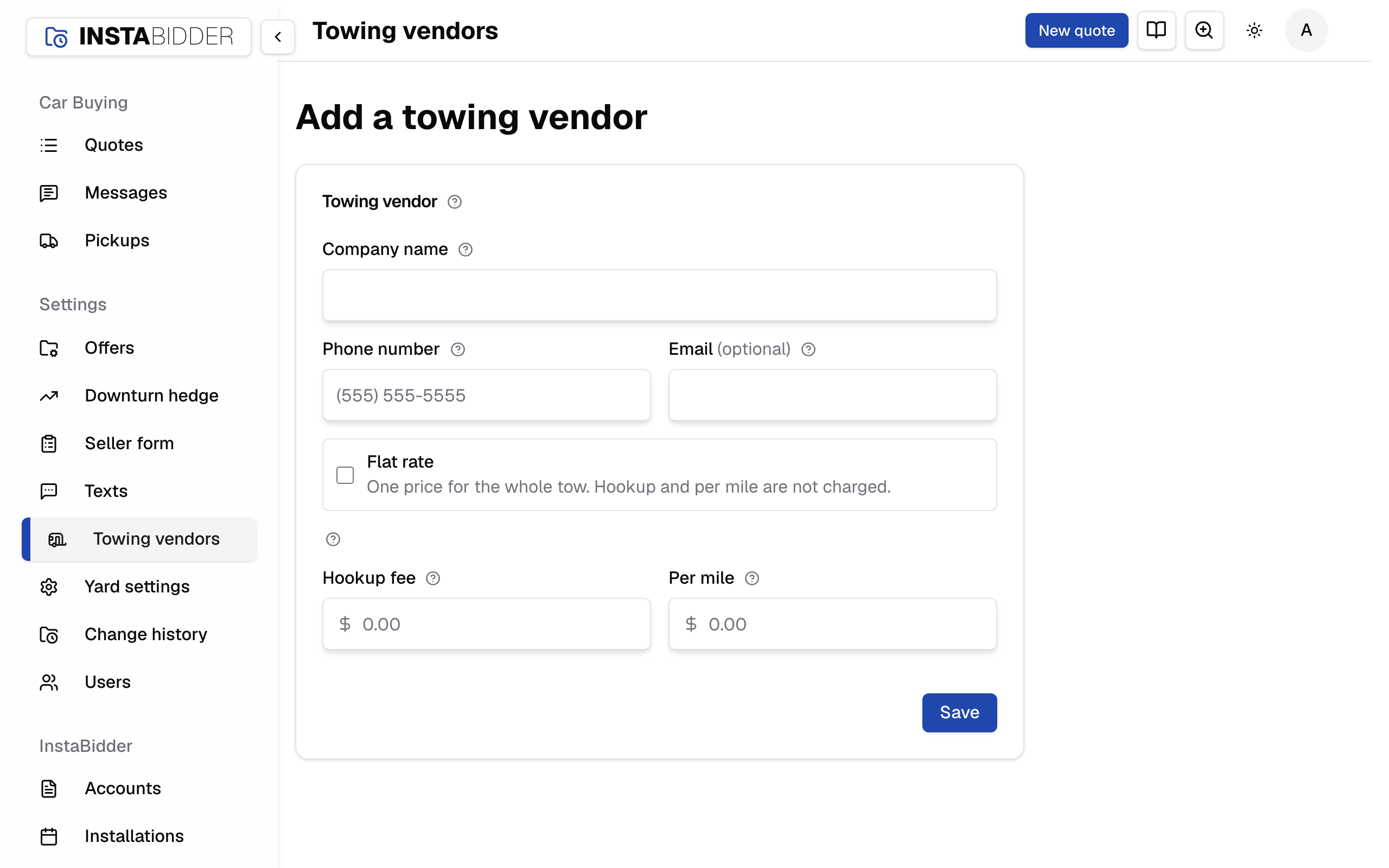
Towing vendor
One tow company: how to reach it and what it charges. Pickups booked with it use these rates to work out the tow cost.
To add one, choose Add a vendor on the Towing vendors page; the page reads Add a towing vendor. To change one, choose the pencil button on its card; the page reads Edit towing vendor. Save keeps your changes; Cancel leaves the company as it was. Every save shows in Change history under Towing.
If someone saved the company after you opened it, your save is held and the page names who; save again to replace their changes. A company someone removed meanwhile can't be saved: "That tow company was removed, so nothing was changed."
Company name
The tow company's name, as your team sees it in the list and when picking a company for a pickup. Required.
It's also the name its texts read under, in Messages and on a quote's Tow texts tab. Leaving it empty is refused: "Enter the company name."
Phone number
The number your team calls to dispatch this company, and where your site texts it about its pickups. It shows on the company's card, and tapping it calls from a phone. Required.
Enter the full number with its area code, and no extension. A number that isn't ten digits, or eleven starting with 1, is refused: "Enter a US or Canadian mobile number." Use a number that can get texts, such as dispatch's mobile: a landline can't.
Texts go to this number:
- the automatic texts to the tow company on Pickup booked or moved and Picked up, when they're on;
- a text your team sends from a quote's Tow texts tab;
- a text from the company's thread in Messages, which reads under this company's name.
Your site reads the number each time a text goes, so a change here reaches the next text, about every pickup the company has. Texts already sent stay in the old number's thread, which then shows as the number. The company's replies come back to your site's number and land with its next booked pickup. Tow company texts covers it end to end.
Leaving it empty is refused: "Enter a phone number for dispatch."
Where to reach the company in writing. It shows on the company's card. Optional.
Flat rate
Check this when the company charges one price for the whole tow. The hookup fee and per-mile charge are then not charged, and you enter just the one price.
When it's checked, the Hookup fee and Per mile boxes are replaced by a single Flat rate box. The company's card shows a Flat rate badge and the one price.
Whatever you had in the other two boxes isn't charged while Flat rate is on. Uncheck the box and you enter hookup and per-mile again.
Hookup fee
A charge on every tow, before the miles. It starts empty, and leaving it empty saves $0.
Enter dollars and cents, from $0 to $10,000. Anything else is refused: "Enter dollars from $0 to $10,000."
Per mile
What the company charges for each road mile, from your nearest location to the pickup. In Canada this box is Per km. Empty saves $0.
Enter dollars and cents, from $0 to $10,000. A Canadian yard types the rate per kilometre; your site keeps it per mile and shows it back per kilometre, so the figure on the card is the one you typed.
How the tow cost is worked out
For a pickup booked with this company:
- With Flat rate, the tow cost is the flat rate. Distance doesn't matter.
- Otherwise it's the Hookup fee plus the Per mile charge times the road miles from your nearest location to the pickup address, to the cent.
For example, with a $75 hookup fee and $3.50 per mile, a pickup 20 road miles away costs $75 + (20 x $3.50) = $145.
Road miles are the distance by road, the way the truck drives it, not in a straight line. If the pickup's distance can't be worked out, the quote shows the company's rate in place of a total, rather than a wrong number. When you choose a company for a pickup, each one is priced the same way so you can compare.
The tow cost is for your team. A seller never sees it, or any other part of how their offer was worked out.
A vendor on a pickup
You pick the tow company when you book a pickup. Your site freezes that company's rates onto the pickup when it's booked. Editing a company's rates later changes the tow cost of pickups you book after that, not the ones already booked.
Remove a company
Open the ... menu on its card on the Towing vendors page and choose Remove. A removed company can't be picked for new pickups; pickups already booked with it keep it. To bring one back, add it again.