Tow company texts
What your site texts the tow company on a pickup, what those texts can and can't say, texting a tow company yourself, and where its replies land.
A tow company is texted as well as called. Your site can text the company on a pickup when the pickup is booked, when it moves, when it's cancelled, and when the car is picked up, and your team can text it from the quote or from Messages. Its replies come back to your site's number and land with the pickup they're about.
Texts to a tow company go to the phone number on its towing vendor, from the same number your site texts sellers from.
How a tow company is texted
Three ways: an automatic text when a pickup is booked, moved, cancelled or picked up; a text your team types on the quote's Tow texts tab; and a reply in the company's thread in Messages.
- Automatic texts go on their own at three points, Pickup booked or moved, Pickup cancelled and Picked up, once you turn them on in Texts. Every one starts off.
- By hand from the Tow texts tab on a quote, about that pickup, with your quick replies to tow companies.
- From Messages, in the company's thread, which holds everything you've texted it about every pickup.
Only a pickup with a tow company chosen has anyone to text, so no automatic text goes to a tow company before a pickup is booked with it.
Pickup booked or moved
The point that starts with a text to the tow company: the car, where it is, the day and the window. It goes when the pickup is booked, and again when its day or window moves.
Your site starts you with one tow company text on this card, sent right away. It says:
Tow job #: at , . Questions?
Your site puts your legal name and a colon in front, so with the sample details the company reads:
Ridge Auto Salvage: Tow job #1042: 2009 Honda Civic at 120 Main St, Grand Rapids, Thursday, October 23 10 AM-12 PM. Behind the pole barn, gate code 4411. Questions? (616) 555-0142
A pickup with no note for the driver reads the same without it.
It starts off. Turn it on from the card, and change its wording or timing like any other text; see Automatic texts.
- After it starts sends it a set time after the pickup is booked or moved. 0 sends it right away.
- At a time on the pickup day sends it on the day of the pickup at the time you set, such as a 7:00 AM reminder to the truck. You can have both: add a second tow company text to the card.
When a pickup moves to another day or window, on the quote or by dragging it on the Pickups board, the pickup counts as booked again and the tow company's text goes again, with the new day and window.
When a pickup goes to another tow company with the same day and window, on the quote or on the board, the new company gets the text, counted from the change. The seller isn't texted again. The company that had the pickup gets the Pickup cancelled text, when it's on.
Pickup cancelled
The text that tells a tow company a pickup it was texted about is off its list: it went to another company, went back to the queue, or the offer was declined or expired.
Your site starts you with one text on this card, sent right away:
Tow job #: is cancelled. Nothing to do. Questions?
With your legal name in front and the sample details, the company reads:
Ridge Auto Salvage: Tow job #1042: 2009 Honda Civic is cancelled. Nothing to do. Questions? (616) 555-0142
It starts off. Turn it on from the Pickup cancelled card. It can go only a set time after the pickup is cancelled, and only to a tow company.
- Only a company that was told. A company gets it only after a Pickup booked or moved text reached it for that quote. A pickup booked while that text was off cancels without one.
- Once per pickup it lost. Moving the pickup on, or changing the quote again, doesn't send it twice. A company that gets the pickup back on a new day or window, is texted about it, and loses it again is told again.
- The new company still hears. When the pickup goes to another company, that company gets its Pickup booked or moved text as usual, and the one that lost it gets this one.
- A move with the same company isn't a cancellation. A new day or window sends the company its pickup text again instead.
- Besides the car and the quote number, it can name . It can't name the day or window, which may be gone or another company's by then.
The text goes to the number on the company's towing vendor, and shows on the quote's Timeline and in the company's thread in Messages.
Picked up
The point a pickup reaches when it's marked picked up. Your site starts you with one tow company text here, so the company knows the job is closed.
Tow job #: from is marked picked up. Thanks. Questions?
It starts off. Turn it on from the Picked up card. It can only go a set time after the car is marked picked up.
Turning on a tow company text
Turn on the text on the Pickup booked or moved card that reads Tow company, and confirm. It goes to quotes started from then on, never to the ones already in your quotes.
- Open Texts from the sidebar. Only an Admin can change it.
- On Pickup booked or moved, find the text marked Tow company.
- Press Turn on, read the wording in the box that opens, and press Turn on again.
A quote that started before you turned the text on never gets it, so a pickup booked today for an older quote doesn't text its tow company. Text that company yourself from the quote's Tow texts tab.
When a tow company text goes
It goes when its point is reached and its time comes, as long as the quote's texts are going, the company has a number that can get texts, and it hasn't replied STOP.
Each of these has to be true, or the text doesn't go:
- The pickup has a tow company with a phone number. See The tow company's number.
- The seller agreed to texts on the number on the quote. Every automatic text on a quote, the tow company's included, needs a number the seller agreed to be texted on. A quote with no number, or a number your team changed on the Seller card, sends none.
- The quote's texts aren't paused. Pause on the quote's Texts tab stops the tow company's texts as well as the seller's.
- The quote started after the text was turned on.
- Your site's texting is set up.
- The tow company hasn't replied STOP.
A text skipped because of the tow company's number shows on the quote's Timeline as Automatic text skipped, with why: "No phone number to text." or "This number replied STOP." Texts still to come, the tow company's among them, are listed at the end of the Timeline under Coming up.
A quote taken on a call still texts its tow company. Only texts to your own team are skipped on a phone quote.
A text more than an hour past its time isn't sent, the same as every automatic text.
What a tow company text can say
The car, the pickup address, day and window, the note for the driver, the quote number, your name and phone, and the seller's first name and offer. Never the seller's number or a link into your dashboard.
The details a text to a tow company can fill in, in curly braces:
- : year, make and model.
- : the pickup street and city.
- and : the day and the two-hour window.
- : the quote number, the one the driver can read back to you.
- and : your legal name and your phone.
- , and : the seller's first name, the offer and the day it expires.
- : the Note for the driver on the pickup, as its own sentence. Empty when there's no note. Only a tow company text or reply can use it.
Never in a text to a tow company:
- , the seller's number.
- , the quote in your dashboard.
- , and : what the seller wrote when they declined, where they left the form, and their latest text.
Saving a tow company text or reply with one of these is refused, and your site names the details it can use. No text ever carries a breakdown of how the offer was built.
The Note for the driver goes to the tow company through , which the pickup text your site starts you with uses. A note changed after the text went isn't sent again; text the change from the quote's Tow texts tab.
The tow company's number
Texts to a tow company go to the phone number on its towing vendor. Enter the full number with its area code and no extension, and use one that can get texts, such as dispatch's mobile.
Your site reads the number when each text goes, so a corrected number gets the next text. Change it on Towing vendors.
- A number that isn't ten digits, or eleven starting with 1, is refused when you save the company: "Enter a US or Canadian mobile number."
- A number that can't get texts, such as a landline, is turned away when you send: "That number can't get texts. Check it, or call them instead."
- Two towing vendors with the same number share one thread in Messages.
- A company you removed still gets the automatic texts for the pickups it already has.
Tow texts on a quote
The Tow texts tab on a quote is your thread with the pickup's tow company. Type in the box and press Send; the company gets it from your site's number.
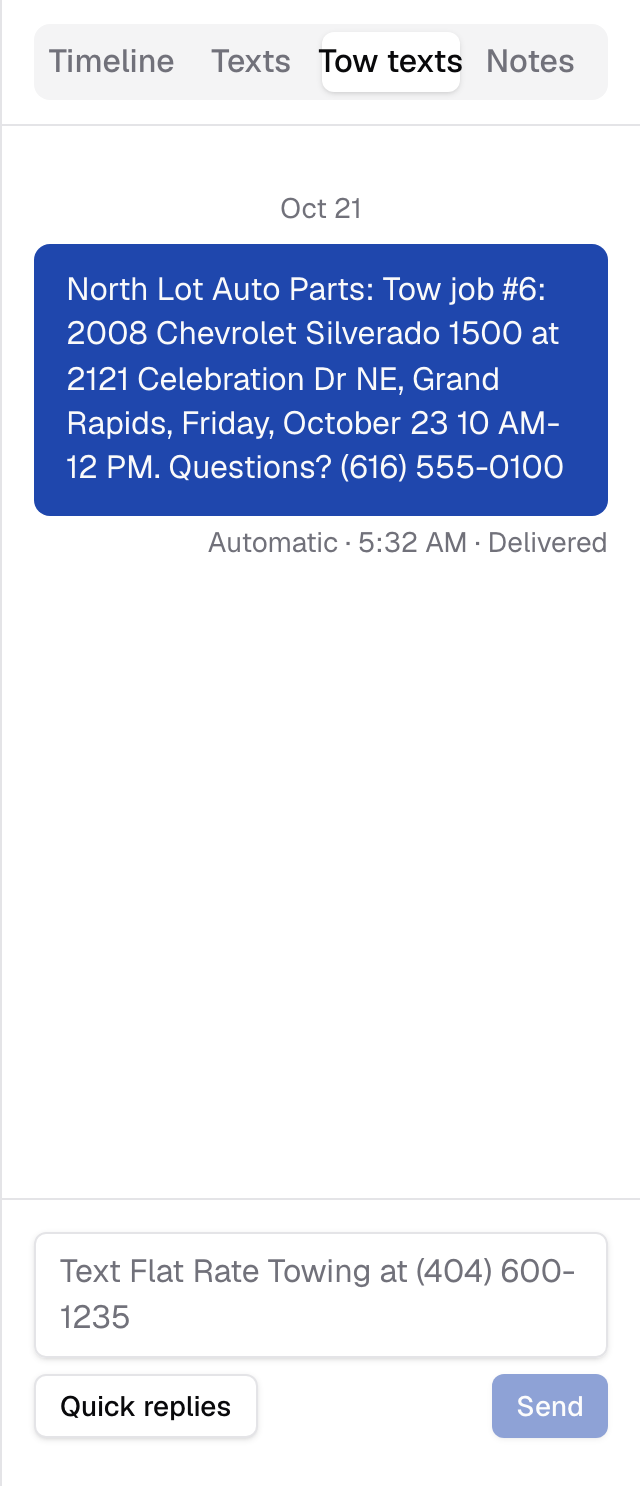
Open it from the tabs beside the quote: Timeline, Texts, Tow texts, Notes. On a phone, open the conversation from the bar at the bottom, then pick Tow texts.
- The whole thread. The tab shows every text with that company's number, about every pickup it has had with you. The quote's Timeline lists only the texts about this pickup.
- The box reads "Text" with the company's name and number. A text you send goes word for word as you typed it: unlike an automatic text, it doesn't open with your legal name. It's filed with this quote.
- Quick replies shows when at least one of your tow company replies has every detail it needs for this pickup, the same as on the Texts tab.
- Texts your site sent on its own are marked Automatic; a colleague's carry their name. Under each one: Sending, Sent, Delivered or Not delivered.
- The company's replies show up as they arrive, without reloading the page.
The tab reads "No tow company chosen yet" until a pickup is booked, the company's name and "has no phone number" when its number can't be texted, and "No texts with" the company's name before the first text.
When a send doesn't go, the tab says why: "Write a message." for an empty box, or the reason the carrier gave. After a STOP the tab reads "This number sent STOP. Nothing further goes out." and has no box. While your site's texting isn't set up, the tab has no box; call the company from its card on Towing vendors.
Quick replies to tow companies
Saved texts for tow companies, filled in for the pickup: Confirm the pickup, Ask for an ETA, Title and keys, Pickup moved. Pick one on Tow texts or in the company's thread, then edit and send.
Each starts with "Tow job #" and the quote number, so the driver knows which car you mean. They use the same details as an automatic tow company text, filled in:
- on a quote's Tow texts tab, for that quote's pickup;
- in Messages, for the company's next booked pickup.
A reply that names a detail the pickup has nothing for isn't offered. Every starting reply names the quote number, so in the thread of a company with no booked pickup, none of them show.
Write, reorder and remove them on the Quick replies to tow companies card; see Quick replies.
Replies from a tow company
A tow company's reply comes to your site's number and lands in Messages, in the thread for its number, under the company's name. It's filed with the company's next booked pickup.
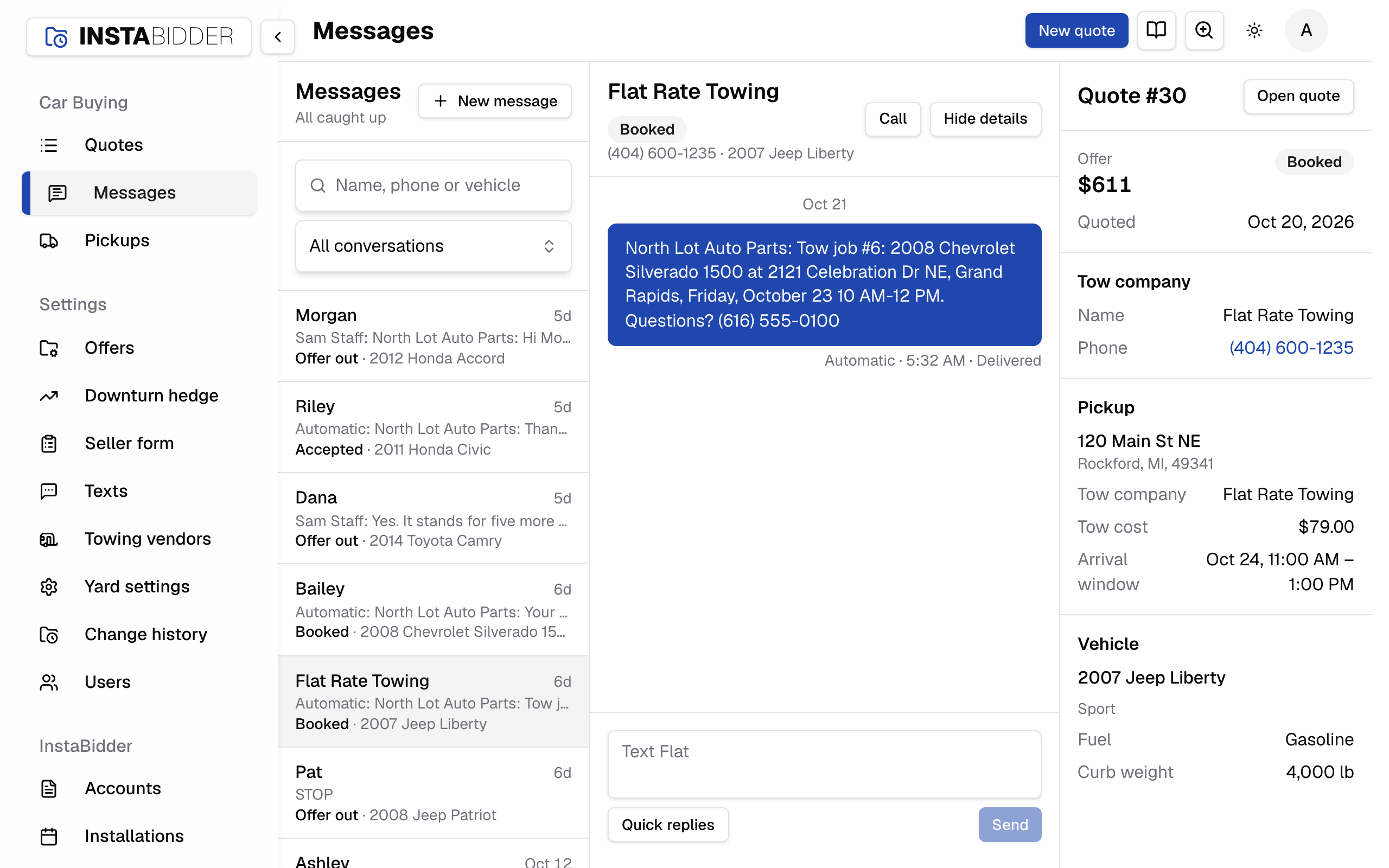
The next booked pickup is the company's pickup not yet picked up that is under way or booked soonest from now, or, when none is, its most recent pickup. The reply shows on that quote's Tow texts tab and in its Timeline, as the company's name and "texted". It never shows on the seller's Texts tab, and it never counts as the seller texting in, so your team isn't sent the company's words as the seller's.
A company that has a few of your cars at once can be answering about any of them. Read the reply in the thread, and answer from the quote it's about.
A company that has never had a pickup booked with it has no quote to file a reply with; its reply sits in its thread in Messages.
Texting a tow company from Messages
Open the company's thread in Messages to read everything you've texted it, across every pickup, and reply. A text sent from the thread is filed with the company's next booked pickup.
- The thread is under the company's name, the name on its towing vendor, and its details are headed Tow company with that pickup's quote.
- Quick replies in the thread offers your tow company replies, filled in for its next booked pickup.
- Call in the header dials the company.
- With no thread yet, press New message, type the company's number and press Start texting.
To text about a particular car, use the Tow texts tab on that car's quote, so the text is filed with it. See Messages.
STOP from a tow company
The first text your site sends a tow company's number ends with the opt-out line. If the company replies STOP, nothing more goes to that number, automatic or by hand.
The first text to the number, automatic or typed, ends with "Reply STOP to opt out or HELP for help." Later texts to it don't repeat the line.
After a STOP:
- The company's thread in Messages reads "This number sent STOP. Nothing further goes out." and has no box.
- The quote's Tow texts tab reads the same and has no box.
- Each automatic text to the company is skipped, and the quote's Timeline reads "This number replied STOP."
Call the company instead. The usual stop words count the same way when they are the whole text; see STOP.
When the company replies START, UNSTOP or YES, the box comes back on Tow texts and in its thread, and its automatic texts go again from then on. See START.
When texting is off
Until your site's texting is set up, nothing goes to a tow company. The Tow texts tab has no box, and automatic tow company texts aren't kept to send later.
Call the company from its card on Towing vendors. A text whose time passed while texting was off doesn't go out once it's on, if it's more than an hour late. See Texting off until your number is set up.