Team
Invite the people who answer quotes, then confirm your team so setup can finish.
The Team step is where you invite the people who'll work quotes with you. It's the same invite as the Users page, without the dashboard around it, so you can add your team before your dashboard opens.
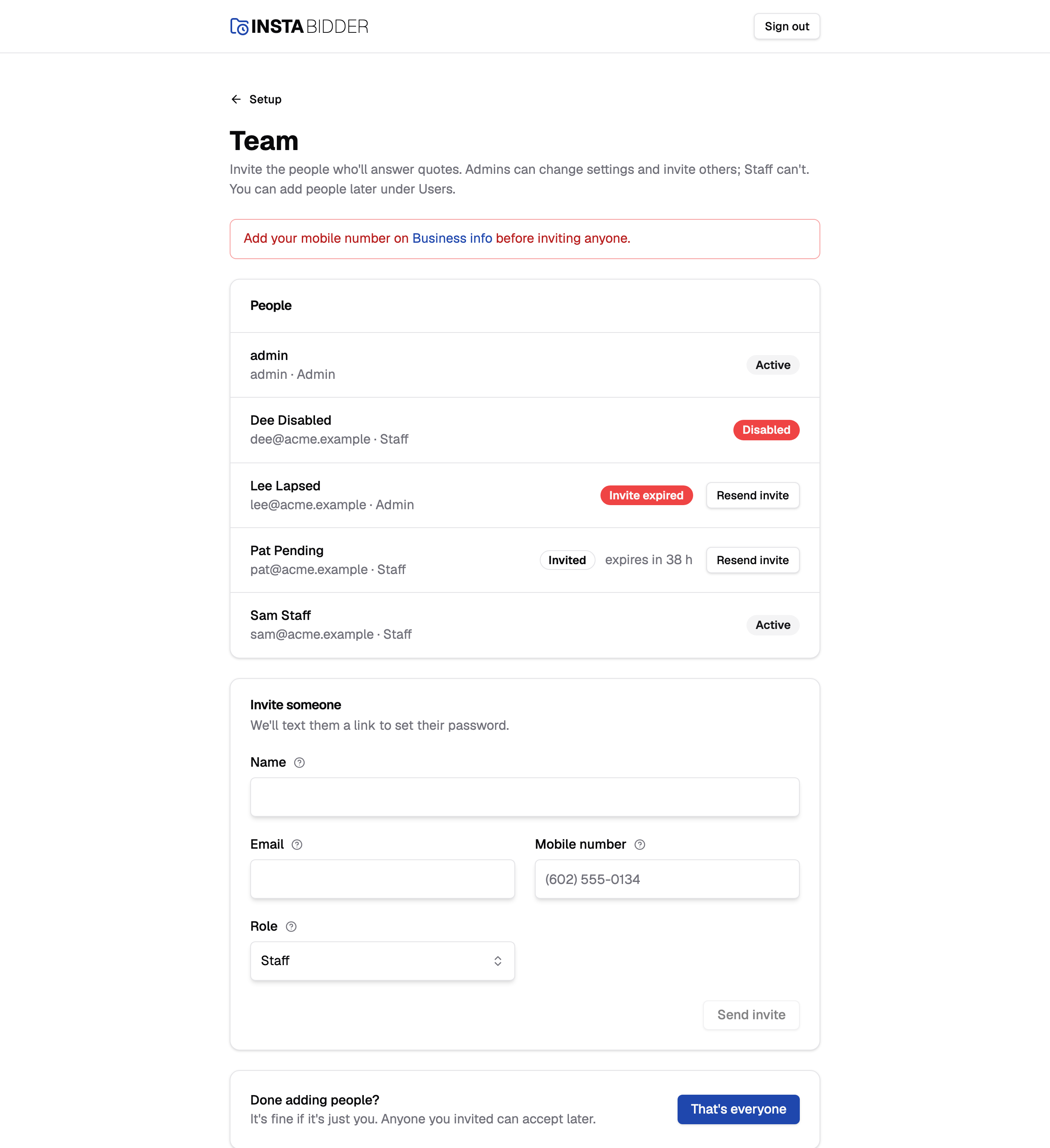
You don't have to add anyone. A yard can be one person, and anyone you invite can accept later.
People
Everyone on your site, with their email and role, and whether they've accepted their invite. Resend invite texts a fresh link to anyone who hasn't.
Each row shows the person's name (or their email, if they have no name), their email and role, and a status:
- Active: they've chosen a password and can sign in.
- Invited: the invite text went out and the link still works. It shows how many hours are left, for example "expires in 48 h" for a link just sent.
- Invite expired: the link is more than 48 hours old. Choose Resend invite to text a new one.
- Disabled: an Admin disabled them on the Users page. They can't sign in.
Resend invite sits beside anyone who hasn't accepted yet and isn't disabled. It asks "Resend the invite?", with the number the new link goes to, the same as on the Users page. Resend texts it, and the old link stops working; Cancel closes it and sends nothing. It's unavailable while texting is off.
To correct someone, change their role, or disable or enable them, use Users once your dashboard is open. InstaBidder's own sign-in, which InstaBidder's team uses if they set your site up, isn't on the list, the same as on the Users page.
Invite someone
Fill in a name, email and mobile number, choose a role and choose Send invite. Your site texts them a link to set their password, which works once, for 48 hours.
The fields are described in Inviting people: Name, Email, Mobile number and Role. Pick Staff for people who work quotes, and Admin for people who need to change settings and invite others. Roles compares the two.
When the text goes out, the page says "Invite texted to" their name, and that it works for 48 hours. They appear in People as Invited. If the text can't be sent, they're still added, and the page says the invite text didn't go out and why; use Resend invite to try again.
Send invite stays unavailable in two cases, each with a notice at the top of the page:
- Texting isn't turned on for your site yet. The notice says "Invites go out by text, so you can invite people once it is." InstaBidder is setting it up, and there's nothing you need to do. You can finish setup without inviting anyone and add people later under Users.
- You have no mobile number of your own. The notice says "Add your mobile number on Business info before inviting anyone." Add yours on Business info first, because your own password reset links are texted to it.
That's everyone
Tells your site you've finished inviting people, so the Team step counts as done. Nobody has to accept their invite first.
It's in the last card, "Done adding people?". Your site can't tell whether you've finished inviting people, so you tell it. Choosing it takes you back to the setup steps, and Change history records it. The step stays done after that, however many people you add or disable later.
You can invite more people later under Users in the sidebar. See Inviting people.