Pickups
The pickup board: every accepted car that needs a tow, a recommended time for each, a map, and every truck's day.
Pickups is where you plan the tows. Every car a seller said yes to is here, from the moment they accept until it's on your lot. The board hands you the pickup that has waited longest with a time it recommends, shows it on the map, and lays every tow company's day out as a timeline so you can see the gaps.
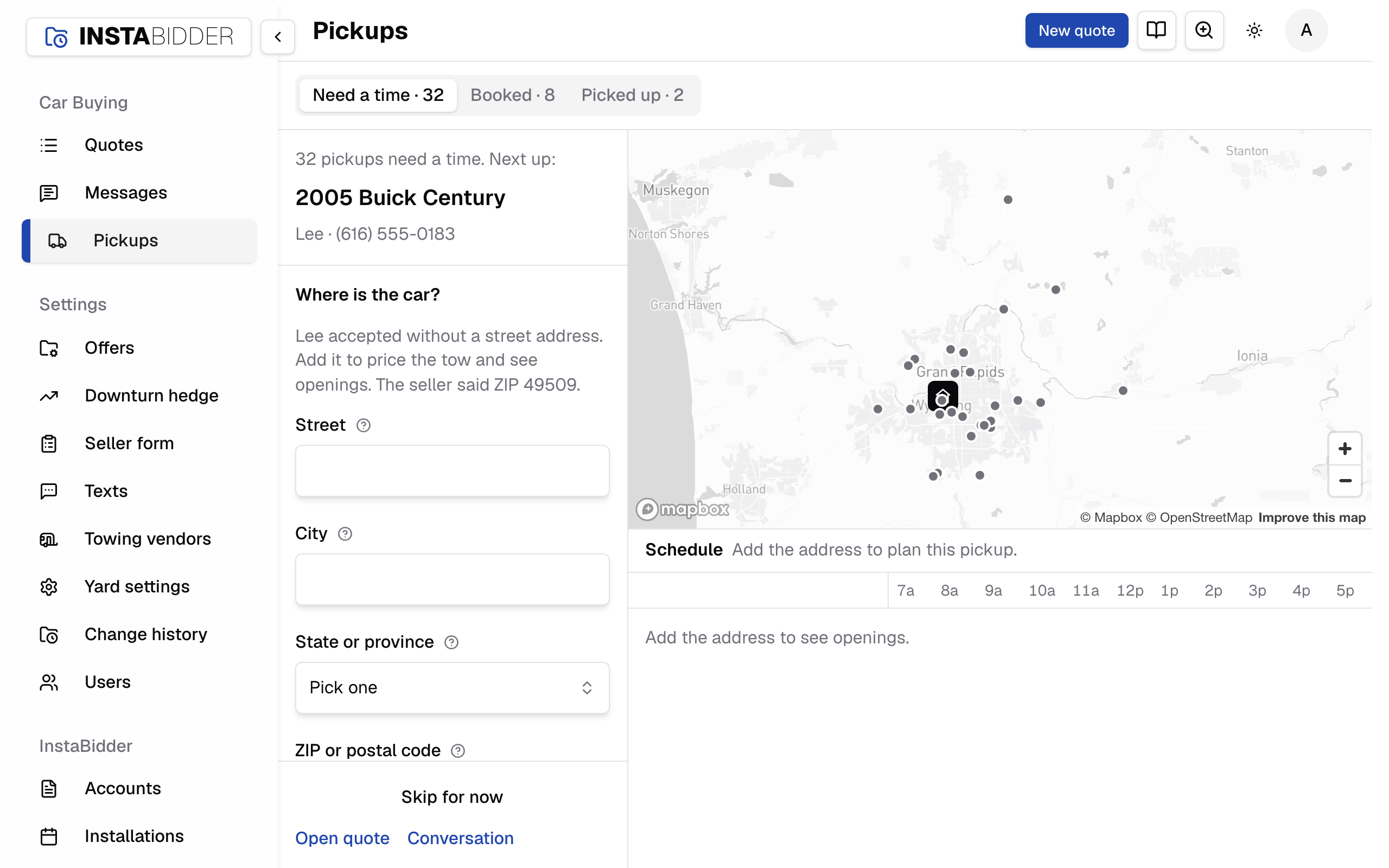
The board has three parts side by side: a panel on the left, the Map and the Schedule. On a narrower screen, buttons at the top switch between them.
Every view of the board is a link: the tab, the pickup you opened, the day on the map, the time you're trying. Copy the address to send a colleague exactly what you're looking at.
Need a time
Accepted pickups with no time yet, with how many there are. The guide shows them one at a time, the one waiting longest first.
New accepted offers show up here as soon as they come in. When every pickup has a time, the panel reads "Every pickup has a time", with See booked pickups. On the last one waiting, the guide reads "Last pickup that needs a time".
Booked
Pickups with a tow company and a time, grouped by day, earliest first. Click one to see it on the map and in its truck's day.
Each row shows the car, the tow company's color, the stop time, the company and the city. A day before today reads "past due". A badge flags a stop that Overlaps another in the same truck's day, or is Off window: planned outside the window the seller was promised.
Search by car, seller or city at the top of the list.
With nothing booked, the list reads "Nothing is booked yet." A search that finds nothing reads "No pickups match that search."
Picked up
Cars that came in, newest first, grouped by the day they were picked up, with what each tow cost.
Before the first, it reads "No pickups collected yet."
The guide
Under Need a time, the panel walks you through the pickups one at a time: the car, the seller, the address, and a choice of times.
It reads how many still need a time, then the car, the seller's name and phone, the address, the road distance, the offer and the quote number. Under that:
- when the seller is available, from the best times on the quote's Pickup card ("Any time" when they gave none), and how long ago they accepted. It turns amber after a day and red after two;
- the Note for the driver, when there is one;
- notices when the address has no road distance yet, so per-mile costs are estimates, or when the map matched the street or ZIP rather than the house.
Open quote and Conversation at the foot open the quote and the seller's thread.
Where is the car
Shown when the seller accepted without a street address. Add it to price the tow and see openings; the ZIP the seller gave is filled in.
Press Save address. The board measures the road distance from your yard and the openings appear. The quote's timeline reads "Pickup address saved" in your name, the same as saving it on the quote.
When should we pick it up
A short list of times to choose from, the recommended one first. Each shows the day, the time, the tow company and what the tow costs.
Picking one shows it on the map and as an outlined stop in the truck's day before anything is saved. Then press Schedule and continue.
With no tow companies yet, the guide reads "Add a tow company under Towing vendors first." in place of the times.
Recommended
The soonest day inside the seller's hours with the cheapest truck free that day. The line under it says why it was picked.
The board weighs the tow bill against how long the seller waits, and gives a small edge to a truck already working nearby. Suggestions start tomorrow: a tow for today is a phone call, so book it with A different time.
The alternatives listed under it are only the ones that buy you something:
- Save $ by waiting: a cheaper company's first opening in the seller's hours, when waiting for it saves real money.
- Days sooner for $ more: an earlier day, when only a dearer truck is free.
- One trip with nearby pickups: other cars that need a time within about 4 miles, booked on the same truck in one run, with what it costs against booking them one by one. Only days every seller in it can do are tried, and every stop ends by 5 PM. When it doesn't make this seller wait much longer, it's the recommendation, and booking it schedules every stop in the trip.
- Just this pickup: the best time for this car alone, when a trip leads.
Best times
The days and hours the seller said suit a pickup, set on the quote's Pickup card. The board plans inside them first.
Fill them in on the quote under Best times for pickup. Then, for that pickup:
- the guide reads them after "is available", such as "Mon–Fri 9 AM–noon";
- the Schedule shows the days they gave, with their hours shaded;
- Recommended and the alternatives are times inside them. Only when no truck is free inside them in the board's six days does it offer other times;
- a time of your own outside them is allowed, with a notice;
- a shared trip only puts sellers together on a day they all gave.
A seller with no best times is flexible: every working hour counts, and the Schedule says so.
A different time
Pick the day, arrival time and tow company yourself. The board shows the stop and its cost before you schedule it.
A time outside the hours the seller said they're available is allowed, with a notice. The board refuses a time that has already passed or falls outside the trucks' hours.
The board's own suggestions cover its six working days. For a later day, step through the weeks with the arrows beside Day, the same weeks the quote's day picker shows; the Schedule then shows that day so you can see the truck's other stops.
Day
The day the truck goes: today or any later day, a week at a time with the arrows beside it. Sundays are skipped.
Arrive
When the truck gets to the car, from 8:00 AM to 4:15 PM in 15-minute steps. The seller is promised the two hours from the top of that hour, or 3 to 5 PM after 3 PM.
A stop takes 45 minutes on site: the winch, the paperwork and paying the seller. So an arrival of 10:30 AM holds the truck until 11:15 AM, and the seller is told 10 AM to 12 PM. An arrival of 4:15 PM is promised 3 to 5 PM: every window ends by 5 PM, when the trucks stop, the same windows the quote's Pickup card offers.
Tow company
The company that picks up the car. Each one is listed with what it would charge for this address.
Add companies in Towing vendors. A company you archived keeps the pickups it has but can't take a new one.
Schedule and continue
Books the time you picked and moves on to the next pickup that needs one. A trip of several cars reads Schedule all and continue.
The line under the button repeats the day, the stop time and the company, and the window the seller is promised. The seller and the tow company get your pickup-booked texts, if they're on: the tow company's goes to the phone number on its towing vendor, with the car, the address, the day and the window. See Tow company texts.
A trip of several cars books each one as its own pickup, so each seller and the tow company get a text for each car.
Skip for now
Leaves this pickup without a time and shows the next one. It stays under Need a time and the guide comes back to it after the others.
Map
Every pickup on a map, colored by tow company, with your yard. Pick a day across the top to see only that day's stops and routes.
- All days and one tab per working day choose what the map shows.
- The legend at the bottom left turns each tow company on and off, and To schedule shows or hides the cars that need a time. A company you hide is hidden in the Schedule too.
- With a pickup open, the map shows that pickup's day.
When no yard location is on the map, a notice says routes start nowhere: add one in Yard settings. When the map isn't set up for your site yet, it reads "The map isn't set up yet. Everything else here works without it." and the rest of the board works as usual.
Schedule
Every tow company's day as a row, 7 AM to 6 PM, one block per stop. Trucks run 8 AM to 5 PM; the hours outside that, and the part of today already gone, are shaded.
With no tow companies to show, it reads "No tow companies to schedule. Add one under Towing vendors, or show a hidden one on the map." A pickup whose day has already gone reads "This pickup's day has passed."
- Each day reads how many stops it has. Click a day to show only that day; Show all days brings the rest back.
- Each company's row reads its share of the working day already booked.
- A line marks the time now.
- While you plan a pickup, the hours the seller said they're home are shaded, openings show as times you can click, and your pick is outlined.
- Hover over a stop for the car, the seller, the address, the stop, the company, the cost and the promised window. A stop that overlaps another is marked.
Dragging a stop
Drag a booked stop to another time or another company's row to move it. The seller keeps their window when the new time is still inside it.
When the new time is outside the promised window, or on another day, the window moves with it: the two hours from the top of the new hour, or 3 to 5 PM for a stop after 3 PM. Your site then treats it as a new booking, so the seller and the tow company get your pickup-booked texts again if they're on. A car already picked up can't be dragged.
Dragging a stop to another company's row inside the same window keeps the seller's window and sends no text. The new company isn't told on its own: text it from the quote's Tow texts tab.
Undo
Every change on the board, a booking, a move, or a pickup sent back, shows a line at the top saying what changed. Undo there puts it back.
Each change, and each undo, is written to the quote's timeline in your name, in the words the quote uses: "Pickup booked with" the company, "Pickup moved, with" the company and the new day and window, "Pickup sent back to the queue", or "Pickup address saved". Texts that a change makes due go out right away.
Undo puts the pickup back as it was, and reads "Change undone". It can't take back a text that already went: if the seller or the tow company was texted about the booking you undid, tell them. With nothing left to undo, it reads "Nothing to undo."
A booked pickup
Click a booked stop to open it: the address, the day and stop time, the company, the tow cost and the window the seller was promised.
A notice says when it overlaps another stop in the truck's day, or is planned outside the promised window.
- Mark picked up opens the quote's form, which asks what was paid and whether the title came; see Mark picked up.
- Reschedule opens the same choice of times under Move to. Pick one; the button then reads Move to with the new day and time. Press it to save, or Keep the current time to leave it.
- Send back to queue takes the time off and returns it to Need a time. The seller stays accepted. Nobody is texted, the tow company included.
- Open quote and Conversation open the quote and the seller's thread.
A booked pickup with no street address can only be moved from its quote: it reads "Add the street address on the quote to move this pickup from here."
When the board refuses a change
A change the board can't make shows a line at the top saying why, and nothing is saved. Check the time or the company and try again.
- "That time has already passed." or "Trucks run 8 AM to 5 PM."
- "Pick a day from today on. Trucks don't run on Sunday."
- "Pick a time first." when Schedule and continue is pressed with no time picked.
- "The board changed since you looked. Check the time and try again." when someone else booked the car meanwhile, or the opening you picked is gone.
- "That tow company is archived, so it can't take another pickup."
- "That car has already been picked up." or "Only accepted offers can be booked."
- "That pickup can't be moved." or "That time can't be booked." when a dragged stop lands somewhere it can't go.
Drive time
The board spaces stops by an estimate of the drive between them, never less than 10 minutes, so a truck has time to get from one car to the next.
The estimate is the straight-line distance, about a third longer for the roads, at 32 mph, in 5-minute steps. It's only for spacing stops. What a tow costs uses the road distance on the quote.
Tow cost
What the tow company charges for this car: its flat rate, or its hookup fee plus the per-mile charge times the road miles from your yard.
The road miles are measured when the address is saved, from your nearest yard location. Until there are road miles, the board ranks companies on an estimate and the cost reads as unknown, or the quote shows the per-mile rate. Set each company's rates in Towing vendors.