Downturn hedge
Lower steel and aluminum prices ahead of a forecast fall in the scrap market, and crush and ship before it lands.
Scrap prices can fall between the day you buy a car and the day you sell its metal. The downturn hedge forecasts, each month, the chance that the steel and aluminum scrap markets fall next month. When that chance is high enough, it lowers the price your offers pay for that metal, by a little, and tells you to crush and ship before your buyers settle their new prices.
Warning
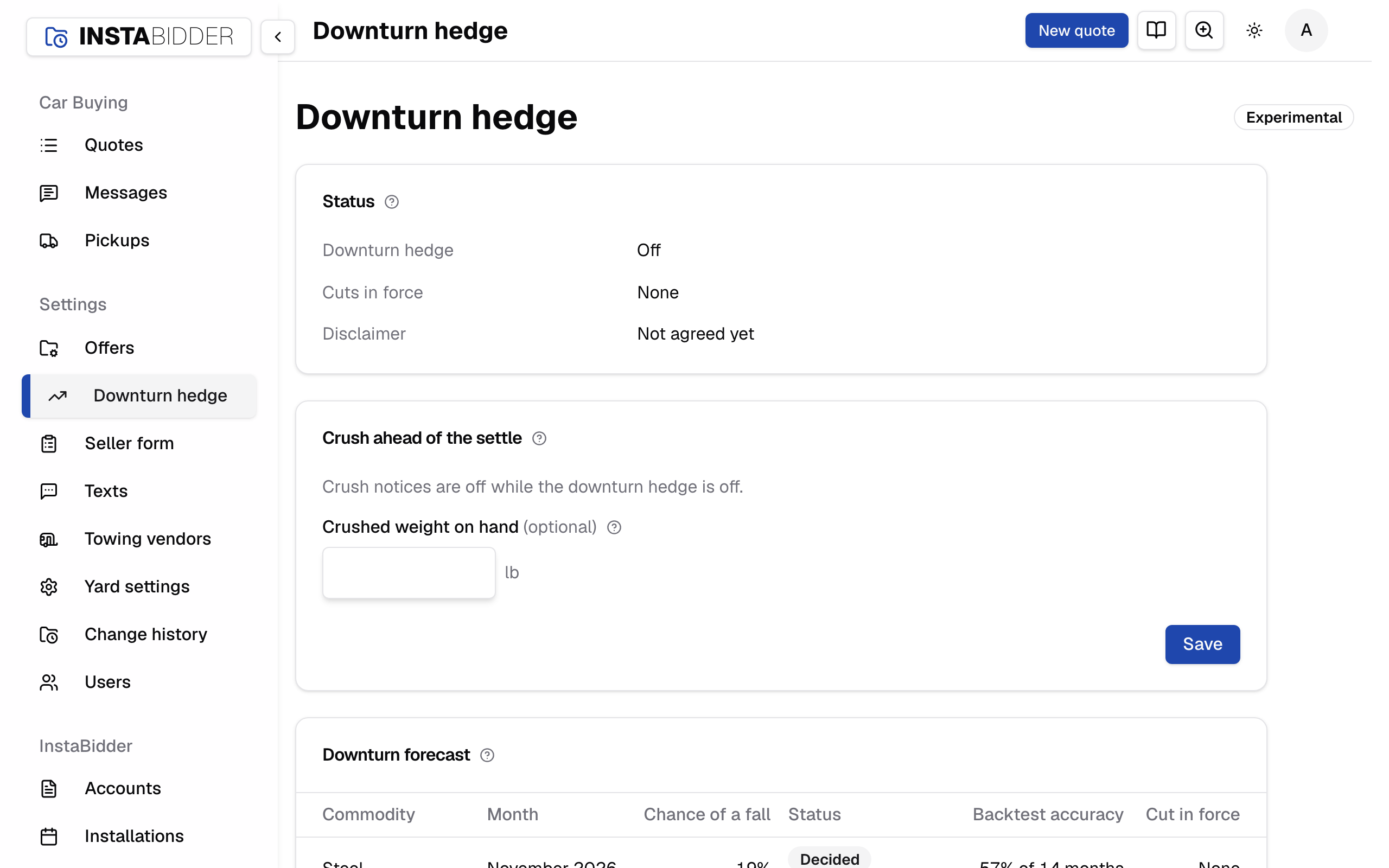
The downturn hedge is experimental, and the page header says so. It's off until an Admin agrees to its disclaimer and turns it on.
What it does and doesn't do:
- It only lowers prices, never raises them. Prices go up only when you enter new prices from your buyers.
- It cuts only two prices: Steel (crushed cars) and Aluminum wheels. The battery, wire harness, answer values and add-ons are never cut.
- It never cuts by more than the largest cut you choose.
- Offers already made keep their prices. A quote made under a cut keeps the cut.
- It only advises on when to ship. It doesn't sell or ship anything.
Everyone who signs in can see this page. Only an Admin can save on it: Staff see the settings and the crushed weight greyed out, with no Save.
The charts at the foot of the page show once your site has the market data for them. Until the first forecast is made, the forecast table reads Waiting for data.
Status
Whether the downturn hedge is on, who turned it on and when, the cuts in force now, and who agreed to the disclaimer.
- Downturn hedge reads Off, or On since the date and who turned it on.
- Cuts in force lists each cut: the metal, the percent off, and since when.
- Disclaimer says who agreed and when, or Not agreed yet.
Turning the hedge on, turning it off, agreeing to the disclaimer and every cut starting or ending are in Change history under Offers. A cut the forecast makes is listed as made by "The downturn forecast".
Enter your buyers' prices
A cut stays in force until you enter your buyers' prices for the next period. When one has been in force for more than 45 days, the page shows Enter your buyers' prices under the status, with a link to Offers. Enter them on Offers, on the Metal prices card, with These are next period's prices from our buyers ticked. That ends every cut.
Crush ahead of the settle
When a fall is likely, the date to crush and ship by, and roughly what waiting could cost on the crushed weight you're holding. It only advises.
The mills settle next month's scrap price in about its first ten days. When the forecast for next month reaches the chance you cut at, this card shows a notice per metal, for example:
Crush and ship steel by Friday, October 30. 78% chance the scrap index falls in November 2026. Waiting until after the settle puts about $1,240 of what you are holding at risk.
- The ship-by date is the last business day before the month the fall is forecast for.
- The dollars at risk show for steel when you've entered your crushed weight on hand: the pounds, times your steel price, times the chance of a fall, times the size of a down month you chose.
- With no likely fall, the card reads "No downturn signal for" next month, for example "No downturn signal for November 2026."
- Notices show only while the downturn hedge is on. They show even at the Off risk tolerance, which cuts nothing.
- While the hedge is off, the card reads "Crush notices are off while the downturn hedge is off."
- Steel's notice gives dollars only once crushed weight on hand is saved. Aluminum's notice gives the date and the chance, with no dollars.
Crushed weight on hand
The pounds of crushed cars you're holding to sell. With it, a crush notice says roughly what waiting until after the settle could cost. Optional.
Enter whole pounds, from 1 to 10,000,000, and press Save on the card. Leave it blank to clear it. Update it as your pile changes; the estimate uses whatever was last saved.
Anything else is refused: "Enter pounds from 1 to 10,000,000, or leave it blank." Saving it doesn't change any offer.
Downturn forecast
The chance of a fall next month for steel and aluminum, whether it's decided, how often the forecast has been right, and the cut in force.
| Column | What it shows |
|---|---|
| Commodity | Steel, or aluminum wheels |
| Month | The month the forecast is for |
| Chance of a fall | The chance the scrap index falls that month, or Waiting for data before the first forecast |
| Status | Decided, with when, or Provisional |
| Backtest accuracy | How often it was right, over how many past months |
| Cut in force | The cut on that metal now, or None |
- Decided forecasts are made once a month, on the 20th, for the month after. Only a decided forecast can cut a price. If a monthly figure isn't out yet, the decision waits for it until the 23rd, then uses the latest there is. If the daily market prices are more than three business days old, the decision waits.
- Provisional forecasts are remade every day so you can watch the chance move. They never change a price.
- There's no forecast yet for wire harness (copper), batteries (lead) or catalytic converters: on those, the forecast hasn't yet done better than going by how often their prices have fallen in the past.
Settings
Turn the hedge on or off and choose how readily and how deeply it cuts. Saving changes only offers made after it.
Press Save at the foot of the card to save everything on it. The page says "Saved.", or "Saved. The hedge is off." when the hedge is off after the save.
If something on the card is refused, nothing on it is saved and the card says what to fix:
- "Agree to the disclaimer to turn the hedge on."
- "Enter a cut from 0% to 15%."
- "Enter a chance from 50% to 95%."
Cut offers when a fall is forecast
Turns the downturn hedge on. Offers then pay less for steel or aluminum when a fall is forecast. Off ends every cut in force.
The first time, and whenever the disclaimer's wording changes, an Admin has to tick I agree under the disclaimer in the same save.
Turning it off ends every cut at once and stops the crush notices. The agreement stays on record, so turning it back on doesn't ask again.
Risk tolerance
How readily and how deeply the hedge cuts. It sets the largest cut and the chance a cut starts at together, from Off, which never cuts, to Lowest.
| Risk tolerance | Largest cut | Cut when the chance reaches |
|---|---|---|
| Off | 0% | (never cuts) |
| High | 2% | 80% |
| Medium-high | 4% | 75% |
| Medium | 6% | 70% |
| Low | 8% | 65% |
| Lowest | 10% | 60% |
The line under the slider says what your setting does, for example "Cuts up to 6.0% per commodity when the chance of a fall reaches 70%." With the largest cut at 0% it reads, for example, "Offers are not cut. Crush notices still show when a fall reaches 70%."
The table under it replays each level against shredded steel since January 2015, as if you had kept it the whole time:
- Cut months a year: how many months a year it would have cut.
- Right when cut: how often the market did fall in a month it cut.
- Falls caught: how many of the real falls it cut ahead of.
At Off, crush notices still show when the chance reaches 70%.
Your level is marked (yours). A lower tolerance for risk catches more falls, and cuts more often in months that don't fall.
Moving the slider sets the largest cut and the chance together, and replaces anything typed under Set the cap and trigger yourself.
Largest cut
The most a cut can take off steel or aluminum prices, from 0% to 15%. At 0% the hedge never cuts, but crush notices still show.
It's under Set the cap and trigger yourself. What you type here is saved only when you leave the risk tolerance slider where it was. It takes a percent to two decimal places, such as 3.25.
Lowering it brings any cut in force above it down to it.
Cut when the chance reaches
The chance of a fall, from 50% to 95%, at which a cut starts and a crush notice shows. Higher cuts less often; lower cuts sooner.
It's under Set the cap and trigger yourself, in whole percents, such as 72. What you type here is saved only when you leave the risk tolerance slider where it was.
Size each cut for
How deep a cut is: a typical down month or a bad one. A bad down month makes deeper cuts, always within the largest cut.
Each cut is the chance of a fall times the size of a down month, never more than your largest cut:
- A typical down month is the middle of every monthly fall in the scrap index since 2011.
- A bad down month is a fall worse than three in four of them.
The same size is used for the dollars at risk in a crush notice.
How a cut works
- A cut starts when a decided forecast reaches the chance you cut at.
- A later forecast that's stronger makes the cut deeper. A weaker one leaves it. A cut never gets smaller on its own.
- A cut ends when you save Metal prices with These are next period's prices from our buyers ticked, or when you turn the hedge off.
- A steel cut lowers your Steel price; an aluminum cut lowers your Aluminum wheels price. The price you entered stays as you entered it on Offers; the cut comes off when an offer is made.
How a cut shows
- On Offers, the Metal prices card opens with Downturn cut in force, naming each cut.
- On a quote made under a cut, the offer card shows Downturn cut: the metal, the cut, the forecast it came from and the price before it.
- A seller sees only the offer. Never the cut.
Disclaimer
The terms you agree to before the hedge can be turned on. Agreeing records who agreed, when, and the wording as it read.
The disclaimer is on the Settings card. Until someone has agreed to it as it reads today, it ends with I agree: tick it and turn the hedge on in the same save. If the wording changes, the hedge asks for a new agreement.
In short, it says the hedge is experimental and may change; a forecast is a probability, not a promise; it isn't financial advice and takes no market position; you set your own prices and decide when to ship; a cut that isn't followed by a fall costs you cars; bad or late market data holds the hedge still; and offers already made stand. Read it in full on the card before you agree.
Backtest
Each forecast replayed over past months: the scrap index, and the chance of a fall it gave each month, marked where it would have cut and where the index fell.
There's one chart for steel, Shredded steel scrap, the crushed car price, and one for aluminum, Aluminum base scrap, the wheel price. Each names how often it was right, and how much better it did than guessing from how often the index has fallen.
- The line above is the scrap index month by month.
- Each bar below is the chance of a fall the forecast gave that month. Bars that reach the chance you cut at are drawn in color, months it would have cut.
- A dark mark under a bar is a month the index really fell.
- The dashed line is the chance you cut at, so it moves with your settings.
Point at a bar to read its month, the chance it gave, and whether the index fell and by how much.
Futures and exchange prices
Daily metal prices from the markets, with the range past moves would put them in over the next 90 days. Those marked Forecast input feed the forecast.
Each chart shows the last two years, week by week, then two shaded bands 90 days ahead: the lighter band is where 8 in 10 past moves would put the price, the darker band the middle half of them. The line under the title gives the latest price and that 8-in-10 range in 90 days.
A chart marked bad prices left out had prices that looked wrong; they're kept out of the forecast.
Scrap indexes
The monthly scrap price indexes the forecasts are about, since 2015, each with its latest figure and its change over 12 months.
The line under each title gives the latest figure, its month, and its change over the past 12 months, such as "412 in September 2026, -3.1% over 12 months".
Shredded steel and aluminum base scrap are the two the forecasts are about. Copper and other nonferrous scrap, including lead, are shown for reference and say No forecast yet.