Results
How far sellers get on your form, by where it asks for the phone and by each order of steps they were given.
Results shows how sellers did on your form in the last 30 days, so you can tell whether a change to the order or the phone helped.
Last 30 days
Every count on this tab is sellers who started the form in the last 30 days. Phone quotes your team takes and demos are left out.
A seller who hasn't answered for an hour counts as having left at the screen they were on. A seller outside your area, one who tapped No thanks, and one who got to the last screen never count as having left. Steps counts the same way; see Reached and left.
With no sellers in the last 30 days, the tab reads "No sellers in the last 30 days" and shows no orders.
Results only reads; there's nothing to change on it, for Admins or Staff.
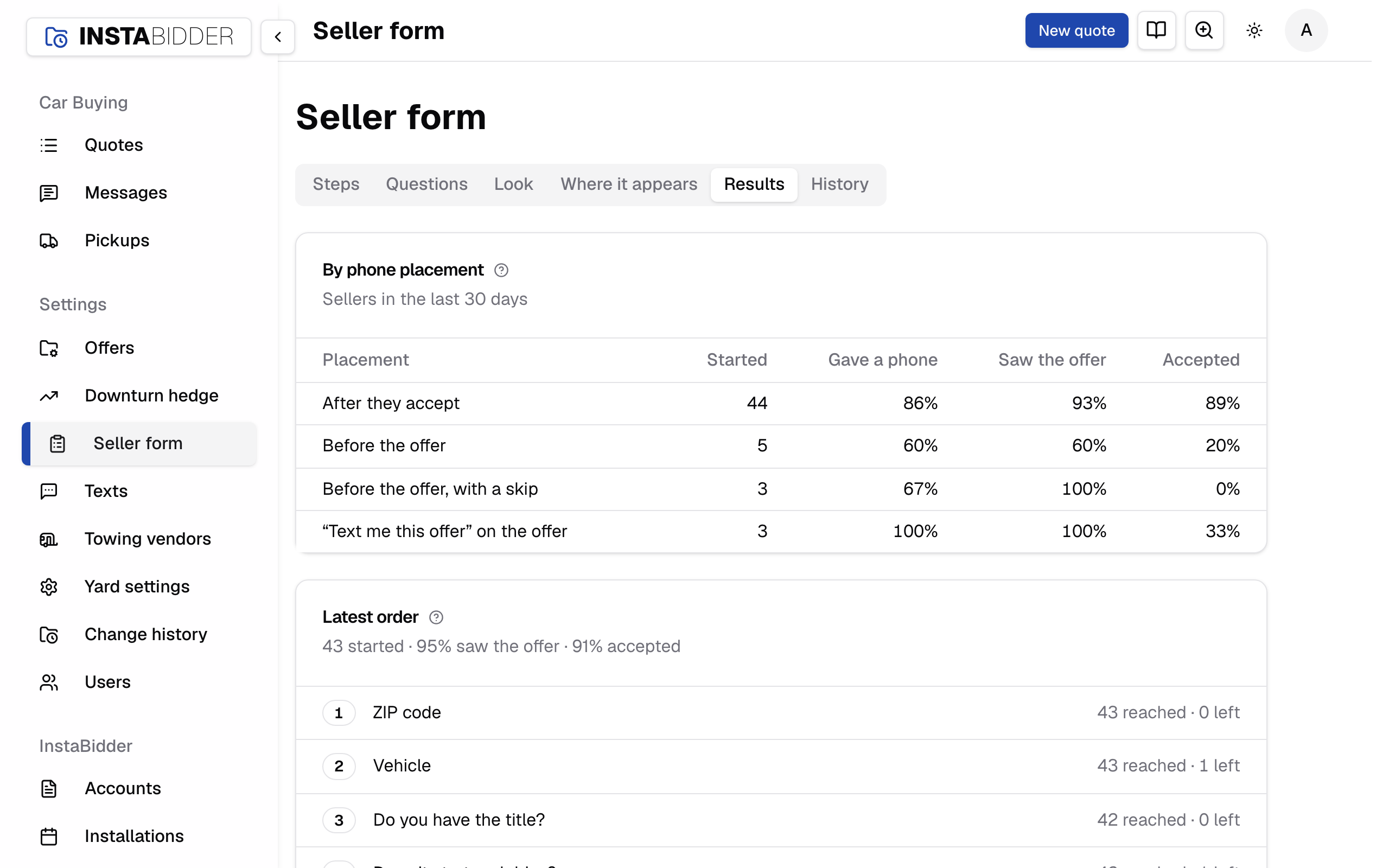
By phone placement
How sellers did under each place the form asked for the phone. Each seller is counted under the placement they started with.
For each placement, named as on Phone:
- Started: sellers who entered a ZIP code.
- Gave a phone: the share who entered a phone number, wherever the form asked for it.
- Saw the offer: the share who got as far as the offer.
- Accepted: the share who accepted it.
A share with nobody to count reads "–".
A placement you've used shows here, even after you change it, while its sellers are within the 30 days. Compare placements over similar stretches of time: a week with few sellers moves the shares a lot.
Latest order
Each order of steps sellers were given, most recent first, with how many reached and left each step. Older orders follow below it, numbered from the oldest: with three orders you see Latest order, then Order 2, then Order 1.
Each card is one order of steps, and sellers are counted against the order they had when they started. The card's line gives how many started, the share who saw the offer and the share who accepted.
A question you've since removed still shows in the orders that had it, with "(archived)" after it, so you can see who left there. A step's name is its question as it reads now, so rewording a question renames it in every order.
An order is the steps in turn when a seller started, as they met them. Moving a step, adding a question or removing one makes a new order, and so does moving the phone from before the offer to after it, or back. Rewording a question or changing its answers doesn't.
Name and phone sits where the form asked for it. When the phone is asked before the offer, it's at its place among the steps. When it's asked after the offer (after accepting, or from "Text me this offer"), it comes after Offer, and counts only the sellers who got there: those who gave a phone after the offer, or are on that screen now. Compare phone placements under By phone placement.
To test a change, move a step on Steps and come back after a few weeks: the new order is the latest, and the old one is below it.