Setup
The short list of steps that opens your dashboard, what finishes each one, and what your team sees until it's done.
A new site keeps its dashboard shut until setup is finished. Setup is five short steps that tell your site who you are, how to text sellers, who is on your team and how your form should look. Only an Admin can do them.
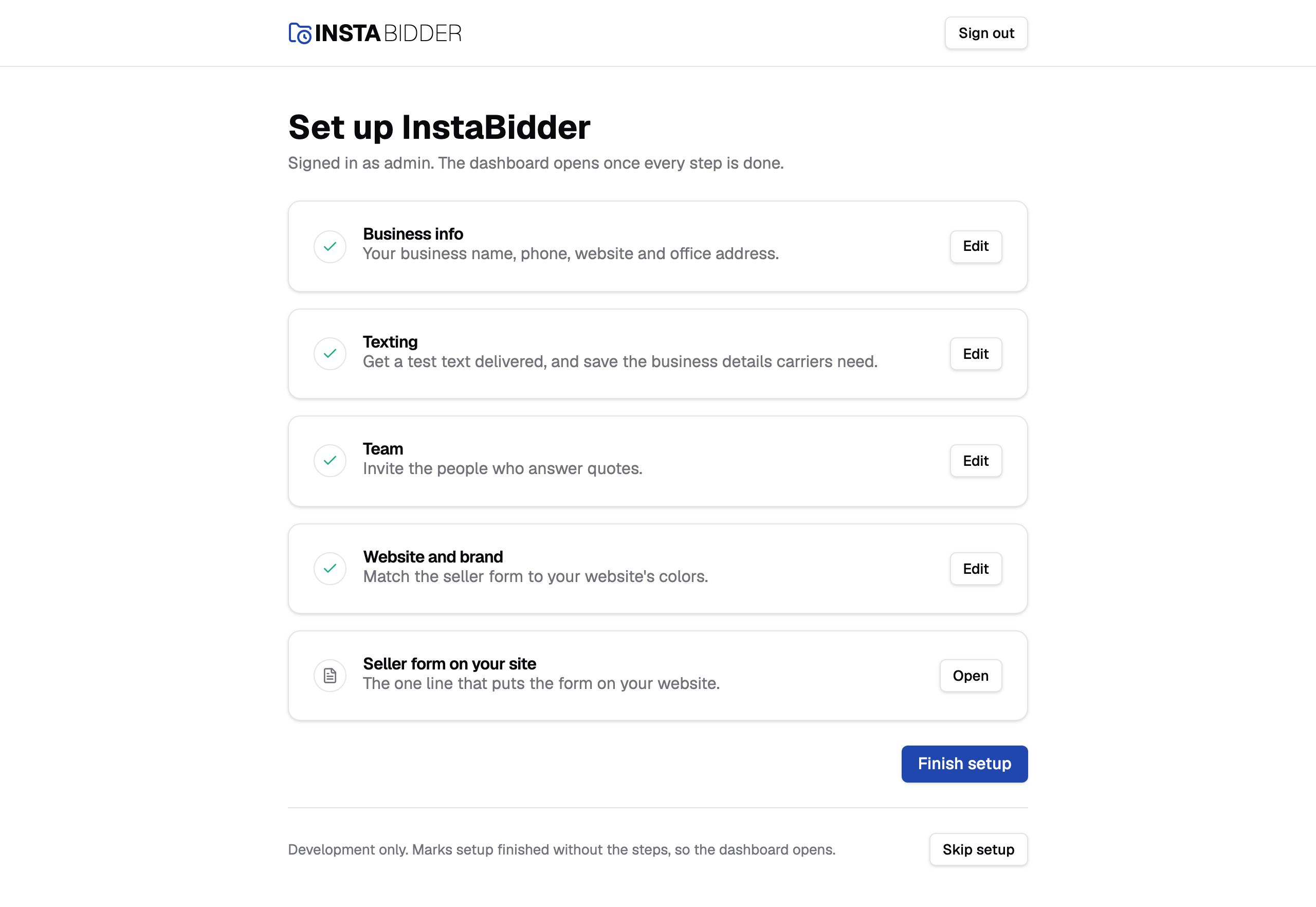
Most yards are set up with help from InstaBidder's team. They sign in to your new site first, fill in your details on Business info and text you a link to choose your password. After that, setup is yours to finish. When InstaBidder sets you up says what's different while they're signed in.
The page is titled "Set up InstaBidder" and says who you're signed in as. Until setup is finished, it adds "The dashboard opens once every step is done."
The steps
The five things your site needs before your dashboard opens. A tick means a step is done, and each step's button opens it so you can fill it in or change it.
| Step | It's done when |
|---|---|
| Business info | Your business name, phone, website and office address are saved. |
| Texting | A test text has been delivered and your business details for carriers are saved. Its row reads "Get a test text delivered, and save the business details carriers need." |
| Team | You choose That's everyone. |
| Website and brand | You've saved the look of your seller form. |
| Seller form on your site | Nothing to finish. It shows the line to paste on your website. |
Your site works out each step's state from what it already holds, so there is nothing to tick off by hand. Each row shows where its step stands:
- A number: not done yet. Its button reads Start.
- A tick: done. Its button reads Edit.
- A page icon: nothing to finish, like Seller form on your site. Its button reads Open.
- Skipped: you chose Skip for now on it. Its button reads Finish.
You can do the steps in any order, except that Texting, Website and brand, and Seller form on your site all need what you enter on Business info first. Each of them says so, and links there, until you have.
Every step's page has a Setup link at the top that brings you back to this list. Saving Business info, choosing That's everyone and saving your look also bring you back.
A step with nothing to finish, like the last one, never holds setup back.
Skipped steps
Phone carriers take a few days to approve a texting number, so you can choose Skip for now on the Texting step. It's then marked Skipped, and it no longer holds setup back.
Choose Finish on it later, once your number is approved; it then counts as done like any other step. See Texting.
If you finish setup with a step skipped, your home page reminds you with a Setup isn't finished notice until that step is done.
Finish setup
Opens your dashboard to everyone on your site. The button appears under the steps once every step is done or skipped.
Choose it and you're taken to your dashboard's home page. Change history records that you finished setup, under the Yard area. The setup page then reads "Setup is finished; the dashboard is open." and the button is gone: finishing is done once.
Until you finish, the header on each step has a Sign out button and no link to the dashboard. Afterwards it has Open dashboard too.
Coming back to setup
Setup stays in your sidebar, under Settings, and as a tile on your home page, for Admins. You can open any step again to change what you entered. Setting a step again never puts the dashboard back behind the lock.
Staff don't see Setup. A Staff member who types its address gets Access denied.
Saving at the same time
If someone else saves a step after you opened it, your save is refused with a message naming them, for example "Sam saved this after you opened it. Save again to replace their changes."
Save again to keep yours, or go back to Setup and open the step again to see theirs. If it was you in another tab, the message says so.
When InstaBidder sets you up
InstaBidder's team signs in to your site with its own sign-in, made for your site when it was created. While they're signed in, setup works for you rather than for them:
- Business info asks for the yard's Admin, with their name, email and mobile, and saving it texts that person their invite. See Business info.
- Texting sends the test text to the yard's Admin's mobile, and starts the carrier contact from their name and email.
- Team needs no mobile number from them before they invite people.
Their invite text reads "Your team invited you to InstaBidder", because InstaBidder's sign-in has no name of its own. Changes they make are in Change history under that sign-in.
InstaBidder's sign-in is never on your Users list, so you can't disable it by mistake. During setup, the Team step's list can show it.
What Staff see meanwhile
While setup is unfinished, a Staff member who signs in sees "Your site is still being set up", with who they're signed in as and a note that someone at the business is finishing setup.
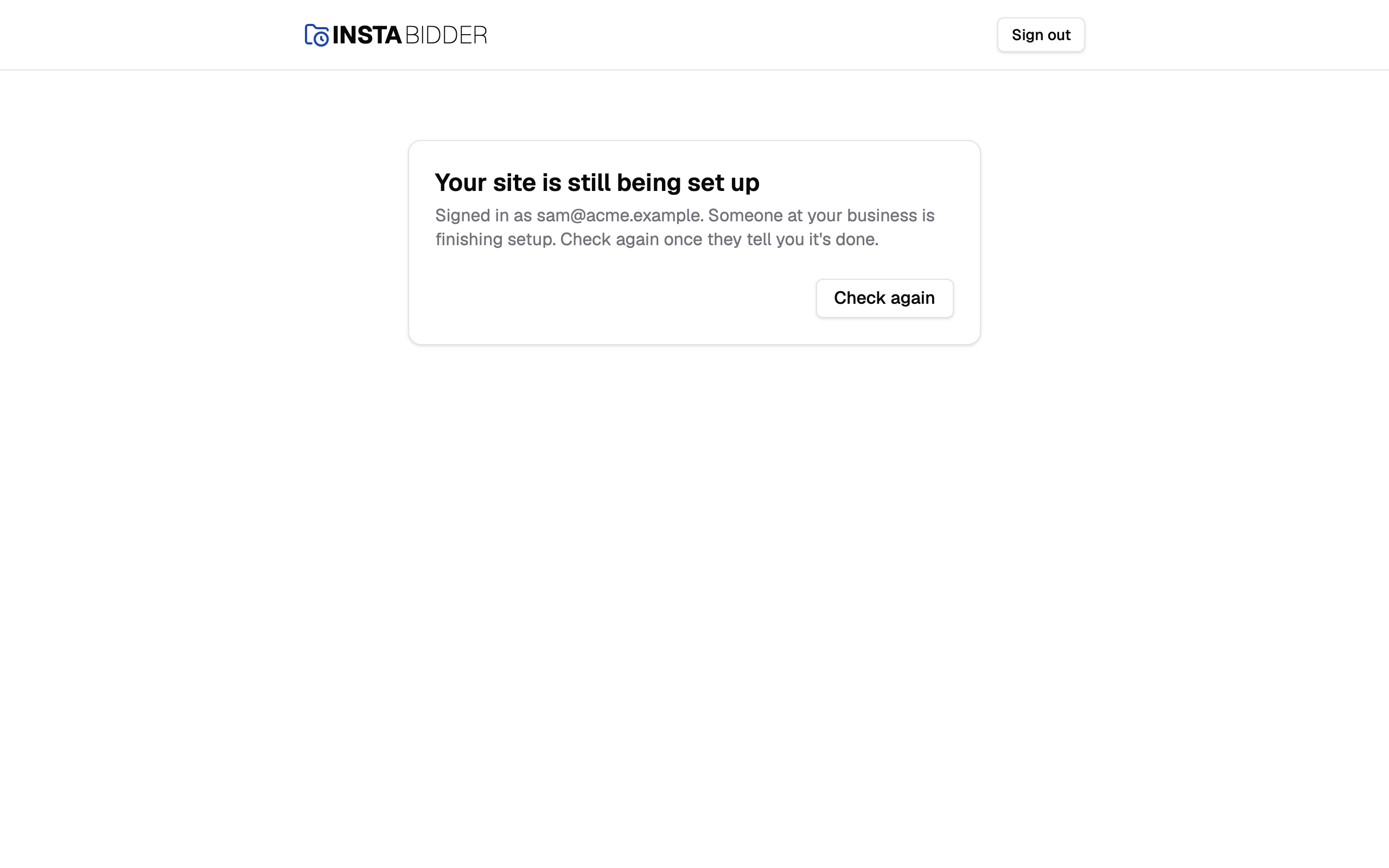
Check again reloads the page, and takes them to the dashboard once setup is finished. Sign out is in the header.
Staff can still do the things that don't need the dashboard: sign in and out, set a password from a texted link, and open their profile. An Admin who tries to open a dashboard page before setup is finished is sent to the setup steps.
Note
You can invite your team during the Team step, and they can set their passwords straight away. They'll see the waiting page until you finish setup.