Questions
The questions your form asks, the answers sellers pick from, and what each answer adds to or takes off the offer.
Your questions are the part of the form you write. Each one is a screen between the vehicle and the offer, and each answer can move the offer up or down. The wording and the dollars are yours.
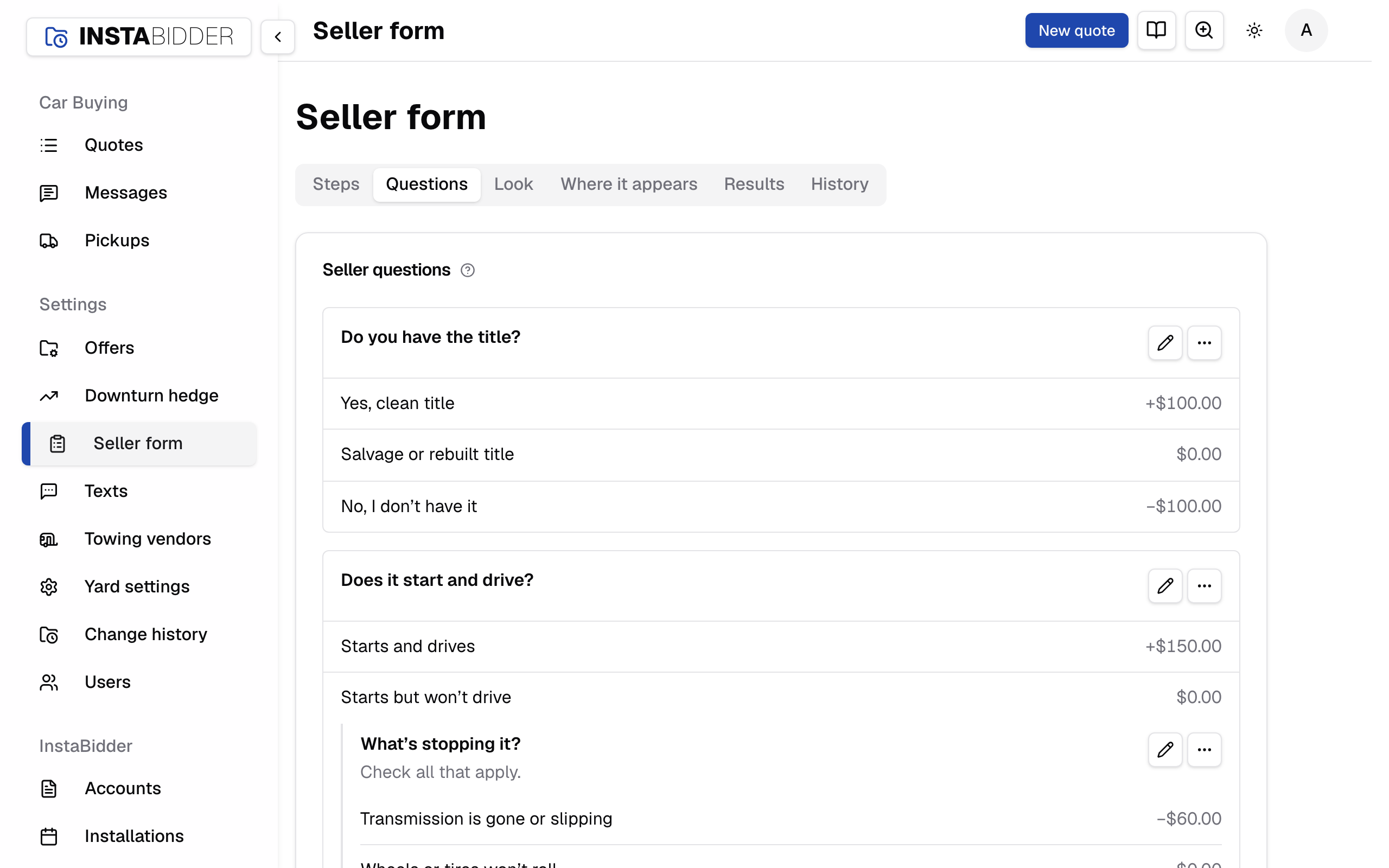
Seller questions
Every question your form asks, in the order sellers get them, with each answer and what it adds or takes off. Follow-ups are indented under the answer that brings them up.
The order here follows Steps, where you change it. The pencil on a question opens it; the menu beside it has Remove. A question with no answers yet says "No answers yet". With no questions at all, the card reads "No questions yet", and the form goes straight from the vehicle to the offer.
Everyone who signs in can see this tab. Only an Admin can change a question: Staff see the questions, answers and dollars read-only, with no Add a question, edit or Remove.
Add a question
Opens a new question with two empty answers. Once saved, it joins the order on Steps ahead of the offer, and you can move it from there.
The editor's title reads New question until you save, then Edit question when you open it again. Saving takes you back to the Questions tab, which says "Saved."
Remove a question
Takes a question out of the form, with all its follow-ups. Sellers stop being asked it; quotes that already answered it keep those answers.
A dialog names the question and every follow-up that goes with it before anything changes: "Remove this question?", or "Remove these questions?" when it has follow-ups, then "Sellers stop being asked. Quotes keep the answers they already have." Press Remove to confirm. The tab then says "Removed.", or how many follow-ups went with it, such as "Removed, with 2 follow-ups."
Past quotes keep the wording and the dollars as they were when the seller answered, so removing a question never changes an offer already made. Removed questions still show, marked archived, in Results for the orders sellers were given.
A seller on the question when you remove it moves on to the next one from their next screen. If someone else removed it first, the tab says "That question was removed, so nothing was changed."
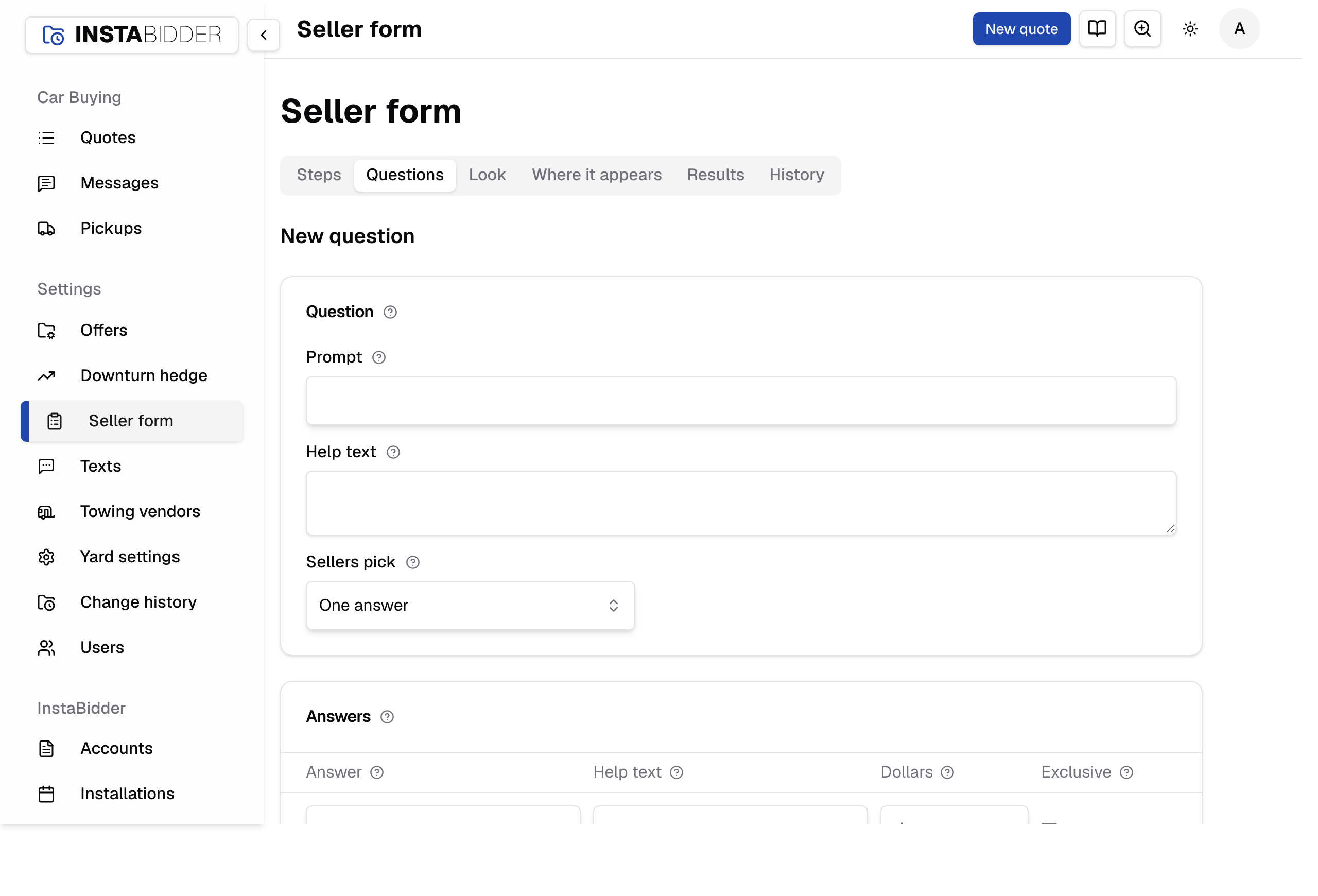
Question
The question itself: what the seller reads, and whether they pick one answer or several. A follow-up says which answer brings it up.
On a follow-up, the line under the card's title reads "Asked when they pick" and the answer, such as "Asked when they pick “No”".
Save is at the foot of the page and takes you back to the Questions tab; Cancel leaves without saving. A change applies to the next screen any seller sees, including sellers already on the form. There's no draft: a saved question is live.
Prompt
The question as the seller reads it, at the top of the screen. Up to 200 characters.
Ask about one thing, in the seller's words: "Does it start and drive?" reads better than "Operational status". Every question needs a prompt.
Longer is refused: "Keep the question to 200 characters."
Help text
Optional. A line under the prompt that helps the seller answer, such as where to look. Up to 300 characters.
Longer is refused: "Keep the help to 300 characters."
Sellers pick
One answer shows round buttons and the seller picks one. Any that apply shows boxes and the seller ticks as many as fit.
A question where sellers pick one answer needs at least two answers. A question where they pick any that apply needs at least one.
Every question has to be answered before the seller moves on. For a question some sellers can't answer, add a "Not sure" answer.
Answers
The answers a seller picks from, in the order they show, and what each one is worth. A blank row is ignored when you save.
Each row has the answer, its help text, the dollars and Exclusive. Under a saved answer is its follow-up, or Add a follow-up. Add an answer is the last row.
Answer
What the seller taps, up to 120 characters. The help text beside it is optional and shows under the answer in smaller type.
Keep answers short and clearly different from each other. A seller should never have two answers that both seem right.
An answer is up to 120 characters ("Keep the answer to 120 characters.") and its help text up to 300. A row with no answer is dropped when you save, even if its help text or dollars are filled in.
Dollars
What this answer adds to the offer. Positive adds, negative deducts, and blank is $0. Sellers never see it, only the offer.
Enter dollars and cents from -$100,000 to $100,000. A seller who picks several answers gets every one of them added to the offer. Anything else is refused: "Enter dollars and cents from -$100,000 to $100,000."
The Questions tab and Steps show each answer's dollars beside it, such as −$150.00 or +$25.00.
For example, on "Is the catalytic converter still on the car?", Yes at $0 and No at -150 takes $150 off when the converter is gone.
Your team sees each answer's dollars in the quote's breakdown. A seller sees one number and never the breakdown.
Exclusive
Ticked, this answer can't be picked with any other, such as "None of these". Picking it clears the other boxes.
Use it on a question where sellers pick any that apply. An exclusive answer can't have a follow-up, because nothing could ever bring it up.
Follow-ups
A follow-up is a question asked only when the seller picks one particular answer, right after this question.
Add a follow-up shows under an answer once it's saved, and opens a new question asked when sellers pick that answer. An answer that already has one shows it with a pencil to edit it.
Add a follow-up saves this question first, as Save does, then opens the new follow-up, so nothing you changed here is lost. The new question opens with "Saved." at the top. If the save is refused, you stay on this question with the reason at the top and the box marked; fix it and press Add a follow-up again.
An exclusive answer can't have one. Pressing Add a follow-up on an answer ticked as exclusive says the answer is exclusive, so a follow-up could never be reached, and saves nothing.
A follow-up can have follow-ups of its own. Keep them shallow: each one is another screen before the offer.
Remove an answer
The X on a row takes the answer out when you save. Quotes that already picked it keep their answer and its dollars. On a phone, the button reads Remove.
Removing the last row leaves one empty row, so the card is never empty.
When the answer has follow-ups, Save stops once and names them: "Removing an answer also removes" and the follow-ups, then "Save again to remove them too." Save again to remove them with the answer.
Warnings
A note at the top of Questions and the editor when a question is legal but likely to cost you sellers. You can still save.
Today the warning is a follow-up more than two levels deep: each extra screen before the offer is where sellers leave. It names the question and how many questions in a row a seller answers to reach it, for example:
Sellers answer 4 questions in a row to reach “Which wheels are missing?”, and some give up with each one before the offer. It still saves; asking it higher up keeps more of them.
You can still save. To clear it, ask the same thing as a question of its own, or in a follow-up higher up, then remove the deep one.
What Save refuses
Save refuses a question the form couldn't ask, says why at the top of the editor, and keeps everything you typed:
- A question with no prompt: "Every question needs a prompt."
- A question with no answers: the question "needs at least one answer."
- A pick-one question with fewer than two: it's "a single-answer question, so it needs at least two answers."
- An exclusive answer with a follow-up under it: the answer "is exclusive, so a follow-up hanging off it could never be reached."
- A question that would be a follow-up of itself: it "can't be a follow-up of itself."
- A question someone else changed after you opened it, for example "Sam saved this after you opened it. Save again to replace their changes." Look at their change in History first; saving again replaces it with yours.
- A question someone else removed while you had it open: "That question was removed, so nothing was changed."
What sellers don't see
Sellers see your prompt, your help text and your answers. They never see an answer's dollars or how the offer was worked out, only the amount.