Steps
The order your form asks things in, how many sellers reach and leave each step, and where it asks for the phone.
Steps is the first tab of Seller form. It shows every screen a seller goes through, in order, how far sellers get, and where the form asks for their phone.
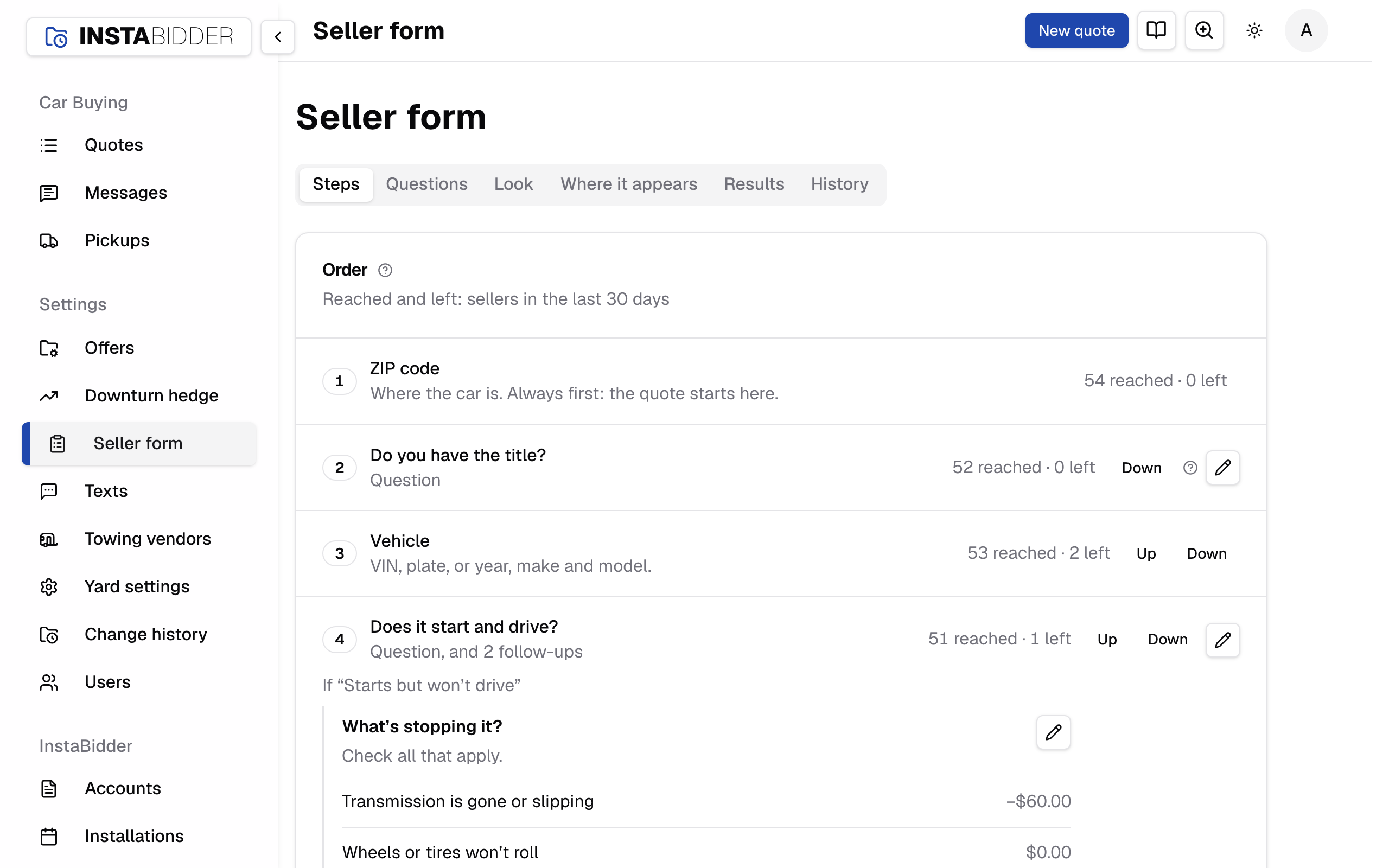
Everyone who signs in can see Steps. Only an Admin can change it: Staff see the order and the counts, with no Up, Down or edit buttons, and the Phone card greyed out.
Order
Every step of your form, top to bottom, as sellers get it. Each row shows how many sellers reached it and how many left there in the last 30 days.
The rows are numbered in order:
- ZIP code: "Where the car is. Always first: the quote starts here."
- Vehicle: "VIN, plate, or year, make and model."
- Each of your questions, one row per top-level question. The line under it reads "Question", or how many follow-ups it has, such as "Question, and 2 follow-ups".
- Name and phone, "With the consent sentence under it.", when you ask for the phone before the offer (see Phone).
- Offer: "Always last: accept, or decline with a reason."
Under a question that has follow-ups, each answer that brings one up is listed, with its follow-ups and their answers and dollars (see Follow-ups).
The pencil on a question's row opens it in the question editor. A change to the order applies to sellers already on the form from their next screen.
When the phone is asked after the offer, a last row marked + says when the form asks for it: "Asked after the seller accepts.", or with "Text me this offer", "Asked on the offer when a seller wants it texted, and after accepting otherwise." It isn't a step you can move.
Reached and left
Reached is how many sellers got to a step. Left is how many stopped there and didn't answer for an hour. Both count the last 30 days.
Phone quotes your team takes and demos aren't counted, so the numbers are sellers on your website only. A step with a lot more left than the steps around it is the one to look at first: a question worded unclearly, or asked too early.
How sellers are counted:
- A seller on a follow-up counts on the row of the question it's under.
- A seller reached every step before the one they're on, in the order they were given, so a step you've moved since still counts what really happened.
- A seller outside your area reached the ZIP code and never counts as having left it: the form ended for them.
- A seller who tapped No thanks, or got to the last screen, never counts as having left.
- A seller still to give their phone after accepting counts on the Offer row, so one who accepted and never gave a number counts as having left there.
Results has the same counts for each order sellers were given, so you can compare before and after a change.
Up and Down
Up and Down move a step one place in the order. The ZIP code stays first and the offer stays last, so they don't move.
Everything between them moves, including the vehicle and the name and phone. You can ask a question before the vehicle, or ask for the phone before your questions.
While the phone is asked after the offer, the Name and phone step isn't listed, and moving any step puts it right before the offer. Switch to asking before the offer and it appears in the order, ready to move.
Up and Down only show where a step can move. If the order changed under you, a move can say "That step isn't in the form any more." or "That's as far as it goes: the ZIP comes first and the offer last."
A move saves at once; there's no Save to press. A move that would break a text that's on is refused, and the message names the text. Change or turn off that text on Texts first, then move the step. See When a change is refused.
Follow-ups
A follow-up is listed under its question, after "If" and the answer that brings it up. It's asked right after that answer, never on its own.
When an answer has more than one follow-up, Up and Down beside them set which is asked first. A follow-up can't move out from under its answer; to ask it elsewhere, make it a question of its own.
Each follow-up has its own edit button and menu, as on the Questions tab. If someone removed a follow-up before you moved it, the page says "That follow-up was removed, so nothing was changed."
Phone
Where your form asks for the seller's name and phone. It changes when you get a number, and how many sellers give one.
Asked
Pick when the form asks for the name and phone. New sellers get the change; a seller part-way through keeps what they started with.
When you save, a dialog asks you to confirm, because the change applies to every new seller. Phone quotes and demos always ask after the seller accepts, whatever you pick here.
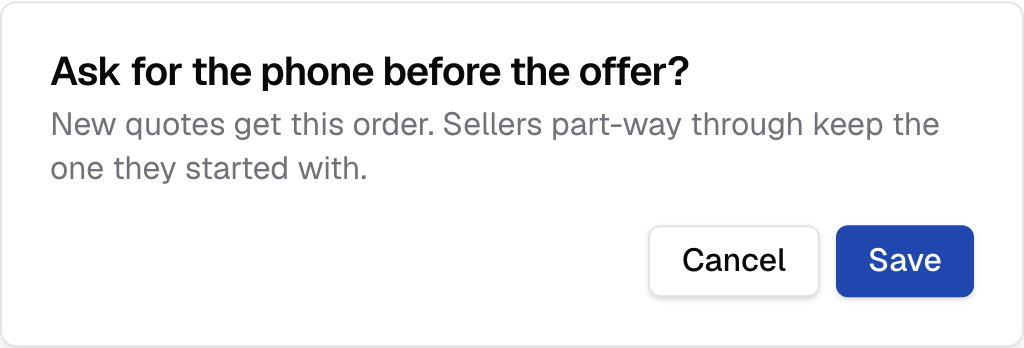
The dialog reads, for example, "Ask for the phone before the offer?", with "New quotes get this order. Sellers part-way through keep the one they started with." Press Save to change it, or Cancel to keep what you have. The page then says "Saved." with where new quotes ask for the phone. Saving the choice you already have says "Nothing changed."
The consent sentence is under the phone wherever it's asked. Entering the number agrees to texts from your yard about this offer.
After they accept
The seller sees the offer first, and gives a name and phone only after tapping Accept offer. The form asks for the least before the offer.
A seller who leaves at the offer has given you no number to follow up with.
Before the offer
The form asks "Where should we send your offer?" before showing it. The Name and phone step then appears in the order, and you can move it.
A seller who gives a number is one your team can text or call even if they don't accept. Some sellers leave rather than give a number first. Accepting goes straight to the last screen, since you already have the phone.
The screen promises a copy of the offer, so the seller is texted the offer when it's first shown, even with every automatic text off.
Before the offer, with a skip
The same as before the offer, with a Skip, show my offer button under the phone. A seller who skips sees the offer, and is asked for the phone after accepting.
“Text me this offer” on the offer
The offer has a Text me this offer button. A seller who taps it gives a name and phone, gets the offer by text and comes back to it. Everyone else is asked after accepting.
The offer is texted as they give the number, even with every automatic text off. When your Offer shown, no answer yet offer text is on, that is the text they get, counted from when they gave the number, and it goes once: set for later, it doesn't send the offer a second time.
When a change is refused
Some texts are sent at a point in the form, such as after the seller gave a phone and left. A placement or a move that would make a text that's on impossible is refused, and the message names the text.
The message starts "Not changed: texts that are on would break." and says why, for example:
- "“Gave a phone, then left the form” never happens while the form asks for the phone after the offer." A seller can only give a phone and leave before the offer when the phone comes first.
- A text that uses the car, such as , can't be filled in at "Gave a phone, then left the form" once the phone is asked before the vehicle.
Change or turn off that text on Texts, then try again.
If someone else changed the order after you opened the page, a move is refused with their name: "Sam changed this after you opened it. It's current now; try again." The page shows the order as it is now.