Texts
What your site texts to sellers, tow companies and your team, when each text goes, and what has to be set up first.
- Automatic texts The texts your site sends on its own as a quote moves from the form to the pickup, when each one starts, and how to write and turn on your own.
- Quick replies Texts your team sends by hand to sellers and tow companies, written once and filled in for the quote you're working.
- Tow company texts What your site texts the tow company on a pickup, what those texts can and can't say, texting a tow company yourself, and where its replies land.
- Team texts Choose which of your team gets each internal text, on which days and between which hours.
Texts is where you decide what your site says by text, to whom, and when. Open it from the sidebar. Only an Admin can change anything here.
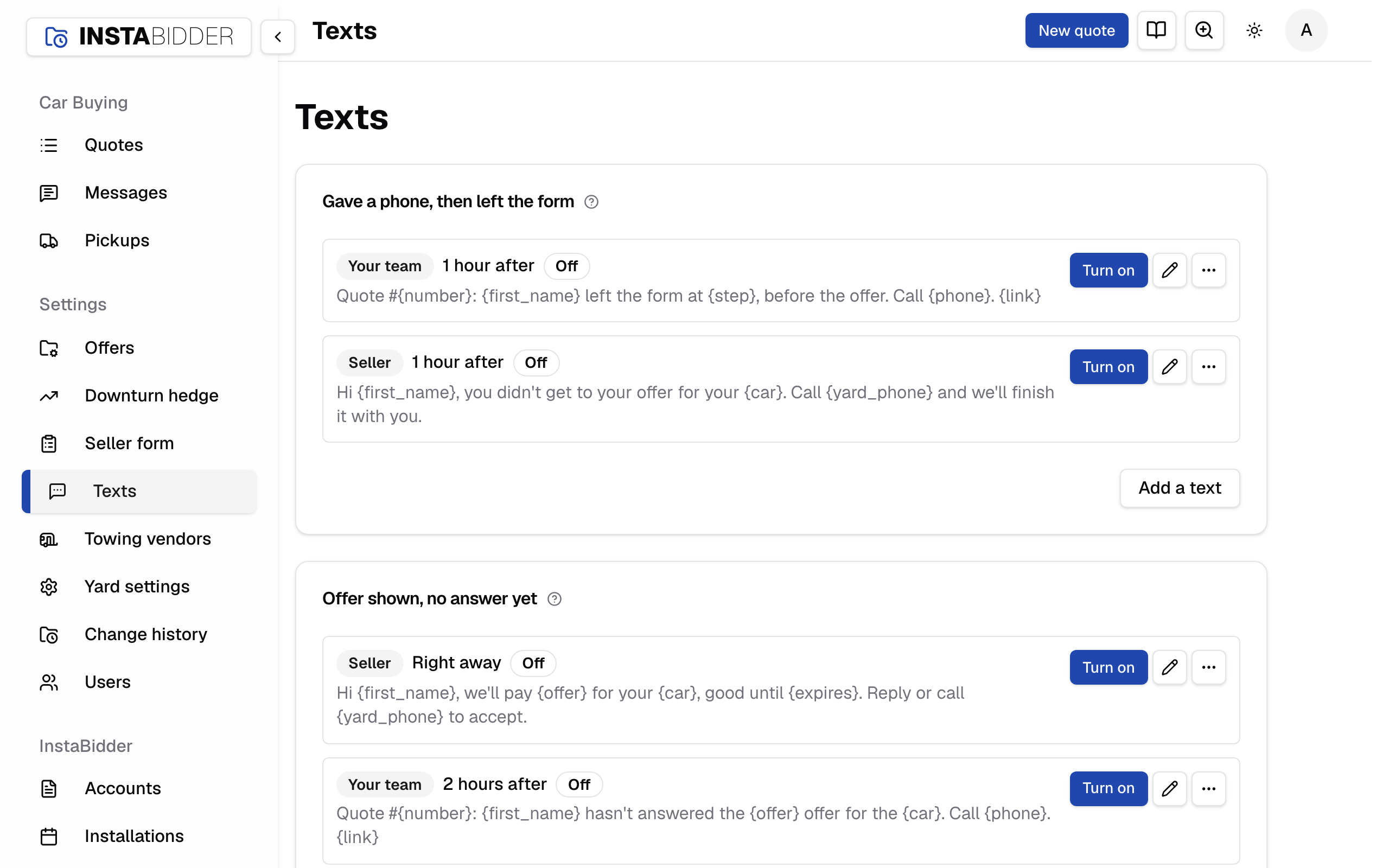
The page has three kinds of card:
- A card for each point in a quote's life, from a seller who left the form to a seller who texted in. Each holds the texts that go out at that point. See Automatic texts.
- Quick replies, one card for sellers and one for tow companies. These are texts your team sends by hand from a quote or from Messages. See Quick replies.
- Your team's texts, which sets who on your team gets which texts, and when. See Team texts.
Tow companies are texted too, not only called. The Pickup booked or moved, Pickup cancelled and Picked up cards can text the pickup's tow company, and your team can text it from a quote's Tow texts tab or from Messages. See Tow company texts.
Every automatic text starts off
Nothing goes out until you turn it on. Each text shows Off until an Admin turns it on, and then shows when it was turned on.
Turning a text on only affects quotes started after that moment. A seller who is already in your quotes never gets a text you turn on later, so you can switch one on without texting anyone from your past. Turning a text off stops it for every quote.
Who the text is from
Every automatic text to a seller or a tow company opens with your legal name, so the person knows who is texting. Set your legal name under your yard's settings. Texts to your own team don't open with it.
A seller only gets texts about their own offer and pickup. They asked for an offer and gave their number for it. Nothing here is marketing.
Consent and the first text
A seller agrees to texts at the phone field on your form. The sentence under the field reads "By entering your number, you agree to texts from" your legal name "about this offer." Entering the number is the agreement.
The first text your site sends to any number ends with a line telling the person how to opt out: "Reply STOP to opt out or HELP for help." Later texts to that number don't repeat it.
STOP
When someone replies STOP, your site stops texting that number. The other usual words work too, such as UNSUBSCRIBE, CANCEL, END and QUIT, when they are the whole message.
A number that sent STOP has no text box in Messages, and no automatic text goes to it. A text typed to it anywhere else is refused: "This number opted out. Nothing was sent." This applies to tow companies and your team's mobiles as well.
The STOP and its time are on the quote's Timeline. Your site doesn't text that number again until it replies START, so call instead.
START
When a number that sent STOP replies START, UNSTOP or YES, your site can text it again. Its text box comes back in Messages and on the quote, and automatic texts due from then on go to it. One skipped while it was opted out stays skipped.
The STOP stays on record: the quote's Timeline shows both, the STOP as Replied STOP and the START as Opted back in, each with its time. A YES from a number that never sent STOP is just a reply.
Until the number replies START, the carrier holds it too. A text sent to a number the carrier holds as opted out is refused, and your site says so: "This number opted out by text. They can text START to opt back in."
Replies to STOP, START and HELP themselves come from the carrier, on your number. Your site doesn't send its own.
Demo numbers
No text goes to a number from 555-0100 to 555-0199, whether a seller's, a tow company's or one of your team's, automatic or typed. Those are kept for demos and examples.
A quote's Timeline shows a seller or tow company text skipped for this reason as "A 555-01xx number, kept for demos and examples." A text typed to one, or a test to a profile with one, is refused: "555-0100 to 555-0199 are kept for demos and examples. Nothing was sent."
Texting off until your number is set up
Texting needs a texting number for your site, and InstaBidder sets that up for you. Until it is ready, a notice reads "Texting isn't turned on for your site yet." You see it on Texts, Messages, a quote, Users and the Team step of setup.
While it shows, you can write and change texts, but nothing goes out. Buttons that would send a text, such as New message, Text the offer and invites, are hidden or disabled. Call sellers instead. There is nothing you need to do to fix it.
Where a text shows up
Every text is recorded on the quote it belongs to.
An automatic text that reached the seller sits in their thread marked Automatic. One that reached the tow company sits on the quote's Tow texts tab the same way. One that was skipped or failed, and the ones to your team, are on the quote's Timeline with the reason. The Timeline also lists the next five due, and the foot of the quote's Texts tab names the next text with a way to pause or resume the quote's texts.
Pausing a quote's texts pauses every automatic text on it: the seller's, the tow company's and your team's. Texts your team types still go.
Every text to or from a number is also in that number's thread in Messages.